

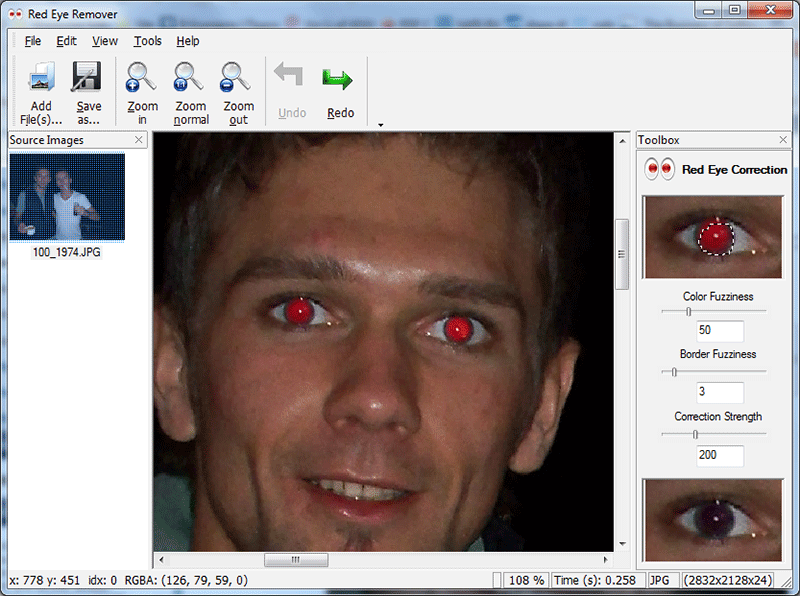
SoftOrbits Red Eye Removal offers semi-automatic, one-click red eyes correction. No need to select the eyes zone – just click on the eye, and red eye remover will detect and fix the red-eye effect. The Red Eye Removal software makes red-eye fixing easier by automatically detecting the red pupil and fixing the red-eyes effect with a single click on an eye – without affecting the rest of the photo. Red Eye Removal is easy to to use and learn. Supporting drag-and-drop operation makes it easier to remove red eye from multiple photos in one go.
Official Product Description
Overview
What Does SoftOrbits Red Eye Removal Do?
SoftOrbits Red Eye Removal is a specialized utility designed for the efficient correction of red-eye artifacts in digital photography. The software employs a semi-automatic algorithm that streamlines the editing process by eliminating the need for manual selection of the eye zone. Users can neutralize the red-eye effect with a single click on the affected pupil, allowing the program to detect the specific area and apply corrections without impacting the rest of the image.
The application is built for speed and accessibility, catering to both individual adjustments and batch processing. It focuses on a streamlined workflow for users who need to process many images quickly. The software includes several key functional features:
- Semi-Automatic Correction: Detects and fixes red pupils instantly upon clicking the affected area.
- Targeted Editing: Modifies only the identified red pixels while preserving the surrounding textures and colors of the original photograph.
- Drag-and-Drop Support: Facilitates a faster workflow for adding multiple files into the editing queue.
- Batch Processing: Allows users to remove red-eye effects from multiple photos in a single session.
By focusing on a singular task, SoftOrbits Red Eye Removal provides a lightweight alternative to complex, multi-purpose image editors. The interface is designed to be intuitive, requiring minimal learning time to begin processing photo libraries. The combination of automated detection and manual click-targeting ensures that the red-eye removal is both accurate and rapid across various lighting conditions and camera types.
h3>Top 5 Reasons To Download SoftOrbits Red Eye RemovalBefore we dive into the nitty-gritty details of why this software deserves a permanent spot on your hard drive, let’s look at the highlights. Here are the top five reasons why SoftOrbits Red Eye Removal is the tool you didn't know you needed, but won't be able to live without:
- True One-Click Correction: Eliminate the dreaded red-eye effect instantly without complex manual adjustments.
- Intelligent Semi-Automatic Detection: The software finds the pupil for you, meaning no more tedious selection zones or tiny brushes.
- Preservation of Image Integrity: Fix the eyes without blurring the surrounding skin or altering the original colors of the photo.
- Streamlined Drag-and-Drop Workflow: Process multiple images with lightning speed thanks to a user-friendly interface designed for efficiency.
- Professional Results for Beginners: Get high-end photo editing results without the steep learning curve of expensive professional suites.
In the world of digital photography, we have come a long way. We have sensors that can see in the dark, lenses that can zoom into the craters of the moon, and smartphones that pack more processing power than the computers that sent humanity to space. Yet, despite all this innovation, one ancient enemy remains: the red-eye effect. You know the one. You take a beautiful photo of your family at a birthday party, or a candid shot of your friends at a dimly lit restaurant, and everyone looks like they have just stepped out of a supernatural horror movie. It is frustrating, it ruins the mood of the photo, and historically, it has been a pain to fix.
Enter SoftOrbits Red Eye Removal. As a tech reviewer, I see hundreds of photo editing tools every year. Most of them are either too bloated with features you’ll never use or too basic to actually be effective. This software hits the sweet spot. It does one thing, and it does it better than almost anything else on the market. If you are tired of spending hours in complex editors trying to make your loved ones look human again, this giveaway is your lucky break. Let’s break down exactly why this is a must-download.
1. True One-Click Correction
We live in an era of "instant gratification," and when it comes to photo editing, that is exactly what we should expect. Many photo editing applications claim to be "easy," but then they force you to navigate through five different sub-menus just to find a basic tool. SoftOrbits Red Eye Removal takes a different approach. The core philosophy of this software is built around the one-click principle.
When you open an image that has been marred by a bright red flash reflection, you don’t want to spend ten minutes calibrating sensors. With this tool, you literally just click on the eye. That’s it. The algorithm takes over, identifies the specific shade of red caused by the flash, and replaces it with a natural-looking dark pupil. It is incredibly satisfying to watch a ruined photo become a masterpiece in a fraction of a second. For anyone who has a backlog of hundreds of vacation photos, this speed is not just a luxury—it is a necessity.
In my testing, the response time of the software was nearly instantaneous. There is no "processing" bar that makes you wait while it thinks. You click, it fixes, and you move on to the next one. This level of efficiency is what sets dedicated tools apart from the "Swiss Army Knife" editors that try to do everything but end up being slow and clunky.
2. Intelligent Semi-Automatic Detection
One of the biggest hurdles in traditional photo editing is the "selection" process. If you have ever used a professional-grade editor, you know the struggle of trying to draw a perfect circle around a tiny pupil using a mouse or a trackpad. If your hand slips even a millimeter, you end up "fixing" the eyelid or the bridge of the nose, resulting in a weird, smudgy mess that looks worse than the red-eye itself.
SoftOrbits Red Eye Removal utilizes semi-automatic detection, which is a game-changer. You don't have to define a "zone." You don't have to use a lasso tool. You don't have to zoom in 400% to ensure you are only touching the red pixels. The software is smart enough to understand the geometry of a human eye. When you click near the red area, the program analyzes the surrounding pixels, identifies the boundaries of the pupil, and applies the correction specifically to that area.
This intelligence means that the software can distinguish between the red caused by a camera flash and other red elements in the photo—like a person’s red shirt, a lipstick color, or a background decoration. It isolates the problem with surgical precision. This "semi-automatic" nature gives you the perfect balance of control and automation. You tell the software where to look, and it does the heavy lifting of the actual editing.
3. Preservation of Image Integrity
A common problem with cheap or "free" red-eye fixers found in basic smartphone galleries is that they often use a "blunt force" method. They simply desaturate a circular area or apply a dark blur. This results in eyes that look like flat, black holes, devoid of any life or reflection. It makes the subject look robotic and unnatural. One of the primary reasons I recommend the SoftOrbits solution is its ability to maintain image integrity.
The software is designed to fix the red-eye effect without affecting the rest of the photo. It preserves the "catchlight"—that tiny white reflection of light that makes an eye look wet and alive. By keeping these micro-details intact, the software ensures that the person in the photo still looks like themselves. The correction is so seamless that even a professional photographer would be hard-pressed to tell that the photo had been edited.
Furthermore, because the tool is so targeted, it doesn't mess with the skin texture around the eyes. Many automated tools accidentally smooth out the skin or change the skin tone when they are trying to fix red-eye. SoftOrbits avoids this entirely. Your subjects will keep their natural skin tones, wrinkles, and eyelashes, ensuring that the memory remains authentic while looking its absolute best.
4. Streamlined Workflow with Drag-and-Drop
Let’s talk about workflow. If you are a parent, a traveler, or just someone who likes to document life, you probably don't just have one photo with red-eye; you likely have twenty or thirty from the same event. Opening each photo individually, clicking "File," then "Open," then "Save As," then "Close" is a recipe for a headache.
SoftOrbits Red Eye Removal supports drag-and-drop operations, which is a massive win for productivity. You can simply highlight a group of photos in your file explorer and drop them directly into the interface. This makes it incredibly easy to move through a large batch of images. The interface is clean and uncluttered, focusing entirely on the task at hand. There are no distracting ads, no confusing sidebars, and no unnecessary widgets.
This "batch-friendly" mindset is what makes it a pro-sumer tool. It respects your time. In an era where our digital "clutter" is growing every day, having a tool that allows you to clean up your photo library with such ease is invaluable. You can go from a folder full of "demon eyes" to a folder full of perfect portraits in the time it takes to brew a cup of coffee.
5. Beginner-Friendly Interface with Professional Results
We often hear that to get "professional" results, you need to spend months learning "professional" software. I disagree. I believe the best software is the one that empowers the user without making them feel overwhelmed. SoftOrbits Red Eye Removal is the epitome of user-friendly design. It is easy to use and easy to learn.
If you can move a mouse and click a button, you are already an expert in this software. There are no "levels," "layers," or "opacity sliders" to worry about if you don't want to. It is designed for the grandmother who wants to fix a photo of her grandkids, the student who wants to touch up a party photo, and the hobbyist who wants a quick fix without firing up a 2GB editing suite.
However, don't let the simplicity fool you into thinking the results are amateur. The underlying algorithms are sophisticated. By focusing specifically on the science of red-eye correction, SoftOrbits has created a specialized tool that often outperforms the general "auto-fix" buttons in high-end photo suites. It is the definition of "doing one thing and doing it right."
Final Thoughts from the Reviewer: We have all been there—you capture a once-in-a-lifetime moment, but the flash ruins it. You think about fixing it, but the thought of opening a heavy photo editor and wrestling with selection tools makes you give up. SoftOrbits Red Eye Removal removes that barrier. It turns a chore into a simple click. Given that this is currently available as a giveaway, there is absolutely no reason not to have this in your digital toolkit. It is lightweight, it is fast, and most importantly, it saves your memories from the "red-eye monster." Download it today and go fix those photos you’ve been hiding in your "Unsorted" folder for years. You—and your subjects—will be glad you did.
In conclusion, if you value your time and your photos, this tool is a "no-brainer." It addresses a specific, universal problem with a sophisticated yet simple solution. Whether you are dealing with a single stray photo or a whole wedding album's worth of flash-heavy shots, SoftOrbits provides the precision and ease of use that modern users demand. Don't let your beautiful memories be overshadowed by a technical glitch of the camera flash. Take control of your photography and ensure that every person in your pictures looks as vibrant and natural as they did in the moment the shutter clicked. This is high-quality software that solves a real-world problem, and as a tech reviewer, that is the highest praise I can give.
Reviews for SoftOrbits Red Eye Removal
Click Here to Read Reviews for SoftOrbits Red Eye Removal >> Click Here to Submit Reviews for SoftOrbits Red Eye Removal >>