What Does Wondershare PDF Editor with OCR Do?
Wondershare PDF Editor with OCR is a comprehensive utility suite designed for home users and small businesses seeking a versatile document management tool. This software provides a centralized interface to create, edit, and convert industry-standard PDF files through a streamlined workflow.
The application offers several core functionalities for document handling:
- Document Creation and Editing: Users can generate PDFs from various file types and modify existing text, images, and layouts directly within the software.
- Advanced Conversion: The engine enables the export of PDF content into editable formats, including Microsoft Word and Excel, while maintaining original formatting.
- Optical Character Recognition (OCR): This technology digitizes scanned documents and images, transforming static files into searchable and editable text.
- Security and Authentication: The suite includes tools to protect sensitive data with password encryption, apply custom watermarks, and execute documents using personalized electronic signatures.
- Annotation and Collaboration: Users can review documents using a variety of commenting tools, highlights, and notes for collaborative projects.
- Form Management: The software allows for the creation, customization, and completion of interactive PDF forms.
- File Optimization: Users can merge multiple documents into a single file or compress large PDFs to facilitate easier sharing and storage.
Wondershare PDF Editor with OCR functions as an all-in-one solution for managing the entire lifecycle of a digital document, from initial creation to final archival.
Top 5 Reasons To Download Wondershare PDF Editor with OCR
- Professional-Grade OCR Technology: Transform scanned images and paper documents into fully searchable and editable digital text.
- Comprehensive "Word-Like" Editing: Modify text, images, and formatting within a PDF as easily as you would in a standard word processor.
- Versatile File Conversion and Creation: Seamlessly turn PDFs into Word, Excel, or PowerPoint files while maintaining original layouts and formatting.
- Robust Security and Digital Signing Tools: Protect sensitive information with high-level encryption and sign legal documents electronically in seconds.
- Intuitive Design for Maximum Productivity: An all-in-one interface that eliminates the learning curve, making complex PDF management accessible to everyone.
In the modern digital landscape, the PDF has become the universal language of business, education, and personal record-keeping. However, for most of us, the PDF is a "read-only" wall. We receive a document, and if we need to change a single typo or extract a table of data, we are stuck. This is where most users begin their frustrating search for a tool that actually works without costing a fortune. If you have been looking for the definitive solution to your document woes, look no further. Wondershare PDF Editor with OCR is not just another utility; it is a powerhouse of productivity that bridges the gap between static documents and dynamic workflows. As someone who tests software for a living, I can tell you that finding a tool that balances power with simplicity is rare. This giveaway provides exactly that. Let’s dive deep into why this software is a mandatory addition to your digital toolkit.
1. Professional-Grade OCR Technology
The standout feature that elevates Wondershare PDF Editor above standard editors is its Optical Character Recognition (OCR) capability. We have all been there: someone sends you a "PDF" that is actually just a picture of a piece of paper taken with a phone or a flatbed scanner. To your computer, that document is just a collection of pixels. You cannot search for keywords, you cannot highlight text, and you certainly cannot edit the content. This is where the OCR engine kicks in.
Wondershare’s OCR technology is incredibly sophisticated. When you run the OCR plugin, the software analyzes every curve and line in the image to identify letters, numbers, and symbols. It then reconstructs the document into a text-based format. This isn't just about making the text "readable"; it makes it functional. Imagine having a twenty-page scanned contract and needing to find a specific clause. Without OCR, you are reading every line manually. With Wondershare, you simply hit "Ctrl+F" and find your term in seconds. For small businesses looking to digitize their paper archives or students dealing with scanned library resources, this feature alone is worth the download. It breathes life into "dead" documents, making them interactive and useful once again.
Furthermore, the OCR supports multiple languages, ensuring that international business documents or foreign language study materials are processed with high accuracy. The precision of the character recognition means less time spent fixing typos created by the software and more time actually using your data. In a world where information is power, the ability to unlock text from an image is a game-changer.
2. Comprehensive "Word-Like" Editing
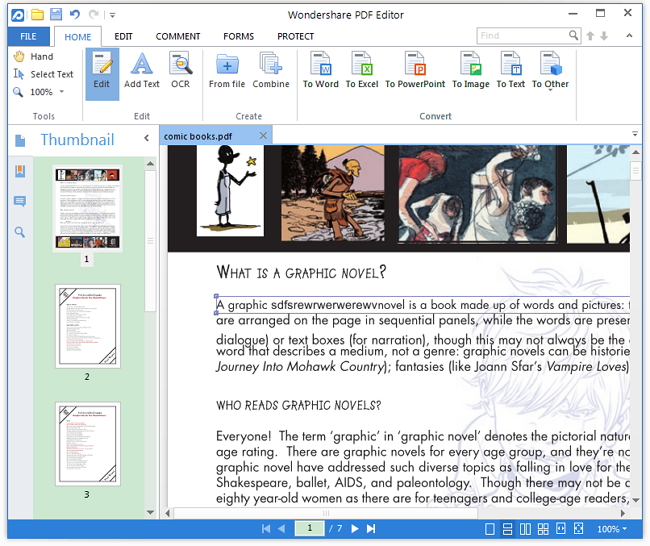
Most PDF "editors" are actually just annotators. They let you draw a box over text or add a sticky note, but they don't actually let you change the underlying document. Wondershare PDF Editor changes that narrative entirely by offering a full-scale editing suite. The user interface is designed to mimic the familiarity of a word processor like Microsoft Word. This means there is virtually no learning curve. If you can edit a document in Word, you can edit a PDF in Wondershare.
The editing capabilities are granular and powerful. You can change the font type, size, and color. You can adjust the alignment of paragraphs or the spacing between lines. Perhaps most impressively, the software features an "auto-match" system. When you start typing in a PDF, the software detects the existing font and style, ensuring your edits look seamless and professional. No more awkward patches of text that clearly look like they were added after the fact.
Beyond text, the image editing tools are equally robust. You can crop, resize, and rotate images directly within the PDF. You can even swap out logos or graphics without ruining the overall layout of the page. This level of control is essential for anyone who needs to update brochures, resumes, or reports where the original source file (like a .doc or .psd) has been lost. It turns the PDF from a final, unchangeable product back into a living document that can evolve with your needs.
3. Versatile File Conversion and Creation
While the PDF is great for viewing, it isn't always the best format for working. Sometimes you need that data in an Excel spreadsheet to perform calculations, or you need the text in a Word document for a long-form rewrite. Wondershare PDF Editor features one of the most reliable conversion engines on the market today. It allows you to export your PDF files into a variety of formats, including Word, Excel, PowerPoint, EPUB, HTML, and various image formats like JPEG and PNG.
The real magic lies in the preservation of the layout. Many free online converters will give you the text but completely destroy the formatting, leaving you with a jumbled mess of images and misaligned columns. Wondershare prides itself on high-fidelity conversion. Tables stay as tables, columns stay as columns, and the visual integrity of your document remains intact. This is a massive time-saver for professionals who need to repurpose content across different platforms.
Conversely, the creation tools are just as impressive. You can create a professional, industry-standard PDF from almost any file type. You can also merge multiple files of different formats—say, a Word document, an Excel sheet, and a JPEG—into a single, cohesive PDF file. This is perfect for putting together portfolios, business proposals, or comprehensive project reports. The ability to "drag and drop" pages to reorder them within the PDF further enhances your ability to curate the perfect document.
4. Robust Security and Digital Signing Tools
In an era of increasing digital threats and the transition to remote work, document security has never been more critical. Wondershare PDF Editor understands this and provides a suite of tools designed to keep your private information private. The software allows you to apply password protection to your files. You can set a password just to open the file, or you can set "permissions" passwords that prevent people from printing, copying, or editing the content even if they can view it.
For those handling sensitive data, the redaction tool is a lifesaver. Unlike simply blacking out text with a drawing tool—which can often be bypassed by highlighting the text underneath—Wondershare’s redaction permanently removes the underlying metadata and text from the file. Once it is redacted, it is gone for good, ensuring that social security numbers, private addresses, or trade secrets remain hidden from prying eyes.
Then there is the matter of signatures. We are moving away from the "print-sign-scan" workflow, which is slow and wasteful. Wondershare includes a comprehensive digital signature feature. You can create your own personalized signature, upload an image of your handwritten signature, or use a typed digital ID. These signatures are legally binding in many jurisdictions and allow you to execute contracts and approvals in a fraction of the time. You can also add "stamps" like "Approved," "Confidential," or "Final," which helps in streamlining the document review process within an organization.
5. Intuitive Design for Maximum Productivity
The final reason this giveaway is a "must-download" is the overall user experience. Too often, professional software is designed for "power users" only, leaving the average person feeling overwhelmed by buttons, menus, and complex jargon. Wondershare has taken the opposite approach. They have built a fully featured program that feels as light and intuitive as a basic app. The ribbon-style interface organizes tools into logical tabs like "Edit," "Convert," and "Protect," so you never have to hunt for what you need.
Small touches make a big difference in productivity. The software includes a powerful compression tool that allows you to shrink the file size of your PDFs without a noticeable loss in quality. This is vital when you are trying to email a large report that exceeds attachment limits. Additionally, the software’s form-filling capabilities are top-notch. It can automatically recognize form fields in a static PDF, turning it into an interactive form that you can type directly into. No more printing out forms just to fill them out by hand.
By downloading this giveaway, you are essentially getting an all-in-one workstation. You no longer need five different apps to handle your document needs. You don't need a separate converter, a separate compressor, and a separate signer. Everything is consolidated into one stable, fast-loading program. It is designed to get out of your way so you can get your work done. Whether you are a small business owner looking to cut costs, a student trying to organize research, or a home user managing digital receipts, this software adapts to your specific workflow.
Final Thoughts
As a tech reviewer, I see a lot of software that makes big promises but fails to deliver on the details. Wondershare PDF Editor with OCR is the exception to that rule. It is a mature, polished product that competes directly with much more expensive enterprise software. It provides the essential tools we all need to navigate a digital-first world: the power to change text, the security to protect our data, and the intelligence to turn images into information.
The value of this giveaway cannot be overstated. Usually, high-quality OCR and advanced editing features are locked behind expensive monthly subscriptions. Having the chance to secure a powerful, all-in-one PDF solution like this is an opportunity any savvy user should take. It solves the "PDF problem" once and for all. It empowers you to take control of your documents rather than being limited by them. From the seamless interface to the "under-the-hood" power of its conversion engine, Wondershare PDF Editor is built for the way we work today. Don't let this chance pass you by—download it, explore the features, and watch your productivity soar. You will quickly wonder how you ever managed your digital life without it.
In conclusion, if you deal with documents on a daily basis, you deserve a tool that works as hard as you do. With its professional-grade OCR, intuitive editing, and robust security, Wondershare PDF Editor with OCR is that tool. It is the ultimate utility for anyone looking to simplify their digital workflow and master their documents. This is a download you will use every single day, and that is the highest praise I can give any piece of software.


Reviews for Wondershare PDF Editor with OCR
Click Here to Read Reviews for Wondershare PDF Editor with OCR >> Click Here to Submit Reviews for Wondershare PDF Editor with OCR >>