What Does Disk Scanner Pro: Find Corrupt Hard Drive Do?
Disk Scanner is a diagnostic system utility designed to identify bad sectors on hard drives and solid-state disks. The software provides a specialized interface for monitoring the physical health of storage media, offering a clear visual representation of drive integrity. Unlike standard tools that process drives one at a time, this utility supports simultaneous scanning across all connected disks to streamline hardware audits.
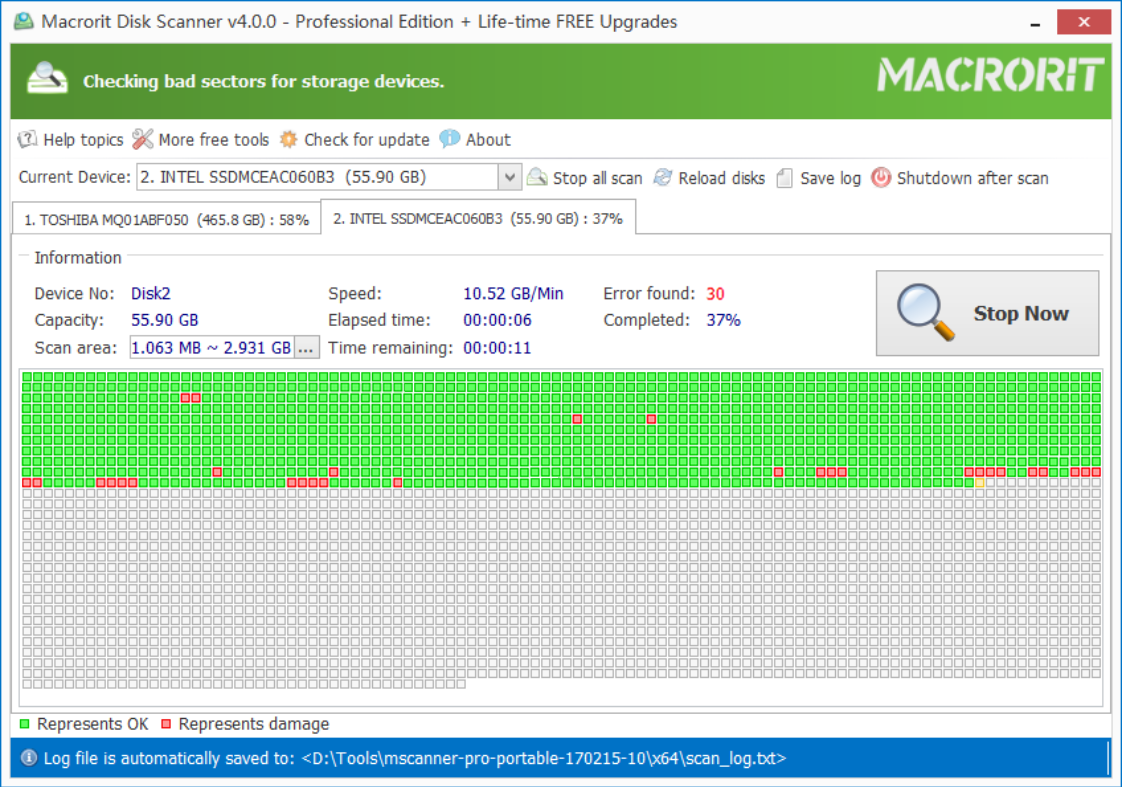
The application offers several scanning modes to suit different technical requirements. Users can choose to examine an entire disk, a specific partition, or only the unallocated free space. For targeted troubleshooting, the software allows for the selection of specific disk regions, which can significantly reduce the time required for a scan. During the process, the tool uses a color-coded grid to report findings, marking healthy sectors in green and damaged areas in red.
Technical features included in the utility are:
- Simultaneous Disk Scanning: The ability to check multiple drives at once to improve efficiency.
- High-Speed Performance: Optimized algorithms designed to scan storage media at the maximum supported hardware speed.
- Automated Log Saving: Scan results are automatically exported to a specified location for later review.
- Auto-Shutdown: A power management feature that turns off the computer once the diagnostic task is complete.
By providing factual data on physical disk errors, this utility assists users in determining the reliability of their hardware and identifying potential data loss risks before they become critical.
Top 5 Reasons To Download Disk Scanner Pro: Find Corrupt Hard Drive
- Blazing Fast Scanning Speed and Performance
- Comprehensive Multi-Disk Simultaneous Scanning
- Granular Control and Targeted Scanning Areas
- Intelligent Automation with Auto-Shutdown and Logging
- Crystal Clear Visual Diagnostics and Reporting
If you have ever experienced the gut-wrenching moment where your computer freezes, a file refuses to open, or the dreaded Blue Screen of Death appears out of nowhere, you know that hardware reliability is not something to be taken for granted. In the world of modern computing, your data is your most valuable asset, yet it sits on physical hardware that is prone to wear, tear, and eventual failure. Whether you are using a traditional Hard Disk Drive (HDD) with spinning platters or a modern Solid State Drive (SSD), the risk of "bad sectors" is a constant, underlying threat. This is exactly why a professional-grade utility like Disk Scanner is not just a "nice to have" tool—it is an essential part of your digital survival kit. Today, I am diving deep into why this specific giveaway is the one you absolutely cannot afford to skip.
As a tech reviewer, I see hundreds of utilities every year, but few address the foundational health of your system as effectively as this disk surface tester. It is designed with a singular, vital purpose: to hunt down the physical defects on your storage media before they turn into a data recovery nightmare. Let’s break down the top five reasons why you need to hit that download button right now and add this powerhouse to your utility folder.
1. Blazing Fast Scanning Speed and Performance
The number one complaint users have with disk diagnostic tools is that they take an eternity to complete. We have all been there—starting a scan and realizing it is going to take twelve hours to finish. Disk Scanner changes that narrative entirely. One of its standout features is its optimized scanning engine, which is built for super-fast speed. This isn't just marketing fluff; the software is designed to communicate with your hardware at the lowest level possible to ensure maximum data throughput during the surface test.
In the world of tech, time is the ultimate currency. If a scan takes too long, users simply won't do it. By prioritizing speed without sacrificing accuracy, this tool encourages regular maintenance. Because it can process sectors so quickly, you can run a health check during a lunch break rather than needing to leave your computer on overnight. This efficiency is achieved through intelligent read algorithms that minimize the overhead on your CPU while maximizing the bandwidth of your SATA or NVMe interface. When you are dealing with multi-terabyte drives, this speed advantage becomes the difference between a task you actually perform and a task you perpetually put off until it is too late.
Furthermore, the "Time-saving scanning method" mentioned in the feature list isn't just about raw speed—it's about smart resource management. The software avoids unnecessary bottlenecks, ensuring that even as it pushes your drive to its safe limits to check for errors, your system remains responsive. For anyone managing large amounts of data, this level of performance is a game-changer.
2. Comprehensive Multi-Disk Simultaneous Scanning
Most basic disk utilities force you into a linear workflow: you scan Drive C, wait for it to finish, then manually start Drive D, and so on. In an era where even budget desktops often have an SSD for the OS and a high-capacity HDD for storage, this "one-at-a-time" approach is outdated and frustrating. Disk Scanner shatters this limitation by offering full support to check and scan all disks at the same time.
This is a massive advantage for power users, creative professionals, and IT administrators. Imagine having a workstation with four different drives. With this tool, you can initiate a surface test across the entire array simultaneously. The software elegantly handles the multi-threading required to monitor different hardware paths at once, presenting you with a unified dashboard of your entire storage ecosystem's health. This parallel processing capability is a "pro" feature that you rarely find in standard freeware.
From a technical standpoint, scanning multiple disks at once is the ultimate stress test for your system's SATA controller and power supply. By providing this feature, the developers are showing confidence in the stability of their code. It allows you to get a comprehensive "health report card" for your entire machine in the time it would normally take to check just one drive. If you are a "set it and forget it" type of person, this efficiency is exactly what you need to ensure no drive is left behind in your maintenance routine.
3. Granular Control and Targeted Scanning Areas
Sometimes, you don't need to scan an entire 10-terabyte drive. Perhaps you suspect an issue within a specific partition, or maybe you just want to ensure that the "free space" on your drive is healthy before you move a massive project onto it. Disk Scanner provides unparalleled granular control over exactly what parts of your storage are being tested. You can choose to scan the whole disk, a specific partition, or even just the unallocated free space.
The ability to scan only the free space is a particularly brilliant inclusion. Why? Because when a drive begins to fail, it often happens in areas that aren't currently being read or written to. By checking the free space, you are essentially "pre-clearing" that area for future use. If the software finds a bad sector in the free space, you know immediately that you should not trust that drive with new, important data. This proactive approach is the hallmark of a sophisticated maintenance strategy.
Additionally, the "Time-saving scanning method" allows you to select or specify a part of the disk/partition to scan only. If you know that your system slows down specifically when accessing a certain folder or segment of the drive, you can target that exact area for a focused scan. This surgical precision saves hours of wear and tear on your hardware and allows for rapid troubleshooting. Instead of a "blunt force" instrument that scans everything, you have a "precision tool" that scans exactly what you need.
4. Intelligent Automation with Auto-Shutdown and Logging
A tool is only as good as its usability, and Disk Scanner excels here by respecting your time and your workflow. Let's talk about the automatic shutdown feature. This is the ultimate "quality of life" improvement for tech enthusiasts. We all know that scanning a massive drive can take time, even with a fast engine. With the auto-shutdown feature, you can start a deep scan before you go to bed or head out for the day, knowing that the software will safely power down your machine the moment the job is done. This prevents your computer from idling for hours, saving electricity and reducing unnecessary hardware uptime.
But what happens to the results if the computer shuts down? That is where the automatic log saving comes into play. The software is designed to automatically save the scan results to a location you specify. This means that when you power your computer back on the next morning, you don't have to wonder what happened. You can simply open the log file and see a detailed report of every sector checked. This level of automation turns a manual chore into a seamless, background process.
For IT professionals who might be running this on a client's machine or a server, these features are indispensable. You can set the scan, walk away, and return later to a professional log that documents the health of the drive. It removes the human error factor and ensures that you have a permanent record of the hardware's condition at a specific point in time. It is this attention to the user experience that elevates Disk Scanner above its competitors.
5. Crystal Clear Visual Diagnostics and Reporting
Technical data is useless if it is difficult to interpret. One of the most satisfying aspects of using Disk Scanner is its intuitive visual interface. As the scan progresses, the software generates a visual map of your disk surface. It uses a simple, universally understood color-coding system: healthy sectors are marked in green, and errors are marked in red.
This visual representation is incredibly powerful. It allows you to see the "layout" of your drive's health. Are the bad sectors clustered in one spot, suggesting physical damage to a specific area of a platter? Or are they scattered randomly, which might indicate a failing controller or widespread aging of the NAND cells in an SSD? Seeing a sea of green gives you an immediate, visceral sense of peace of mind. Conversely, seeing even a single red block serves as an urgent, clear warning that it is time to back up your data and replace the drive.
Emphasizing clarity is key in system utilities. You don't want to be squinting at hex codes or confusing error strings. You want to see at a glance whether your hardware is trustworthy. This software provides that "at-a-glance" confidence. When you combine this visual map with the detailed saved logs, you have a complete diagnostic suite that is accessible to beginners while remaining powerful enough for experts. It takes the mystery out of disk health and puts the power of information directly into your hands.
Why You Shouldn't Wait to Download This
We often treat our storage drives like black boxes—we save files to them and expect them to work forever. But the reality is that hard drives are mechanical devices with moving parts, and SSDs have a finite number of write cycles. They are all destined to fail eventually. The goal isn't to prevent failure (which is impossible) but to predict it. By downloading this giveaway, you are giving yourself the gift of foresight.
A "bad sector" is essentially a tiny part of your drive that has become unreadable. If a critical system file or a precious family photo happens to be stored on that sector, that data is gone. Often, a drive will develop a few bad sectors long before the entire unit fails. If you catch these early signs using a surface scanner, you can migrate your data to a new drive safely. If you wait until the drive starts making clicking noises or fails to boot, you may be looking at professional data recovery services that cost thousands of dollars.
Using Disk Scanner is like taking your car in for a diagnostic check-up. You might think everything is running fine, but a professional scan can reveal underlying issues that haven't caused a breakdown yet. This software is lightweight, portable, and incredibly efficient. It doesn't clutter your system with unnecessary background processes; it sits ready to perform when you need it most. Whether you are checking a brand-new drive for "infant mortality" defects or monitoring an old drive that has been in service for five years, this tool provides the data you need to make informed decisions about your hardware.
The Professional Edge
In my years of reviewing software, I have found that the best tools are those that do one thing and do it exceptionally well. Disk Scanner doesn't try to be a photo editor, a web browser, and a disk cleaner all at once. It focuses entirely on surface integrity. This specialization means that the developers have poured all their effort into the scanning engine, the error detection logic, and the user interface for hardware diagnostics.
The support for modern hardware is also a major plus. Many older disk tools struggle with the massive sizes of modern 14TB+ drives or the unique architecture of NVMe SSDs. This utility is built to handle the modern landscape, ensuring that no matter what kind of storage you are using, you can rely on the results. The inclusion of features like "scanning free space" and "simultaneous disk checking" shows a deep understanding of what actual users need in their day-to-day lives.
Final Thoughts from the Reviewer's Desk: If you care about your photos, your work documents, your gaming library, or your system stability, you need a way to verify the physical health of your drives. This giveaway offers a premium solution for free. It is fast, it is smart, it is automated, and it is incredibly easy to read. There is no reason to leave your data's safety to chance. Download Disk Scanner, run a scan on your drives, and enjoy the peace of mind that comes from knowing your "green sectors" are holding your digital life safely. Don't wait for the red blocks to appear when it's too late—be proactive, be smart, and grab this utility while you can.
In summary, the combination of high-speed performance, multi-drive support, targeted scanning, auto-logic, and visual reporting makes this an unbeatable package. It is a professional-grade tool wrapped in a user-friendly interface. It represents the best of system utility design: powerful enough for the lab, but simple enough for the living room. Make sure you take advantage of this giveaway and give your storage the check-up it deserves.

Reviews for Disk Scanner Pro: Find Corrupt Hard Drive
Click Here to Read Reviews for Disk Scanner Pro: Find Corrupt Hard Drive >> Click Here to Submit Reviews for Disk Scanner Pro: Find Corrupt Hard Drive >>