What Does Image Former Professional 2 Do?
Image Former is a Windows-based utility built to streamline the modification of large image libraries through automated batch processing. The software allows users to import multiple files simultaneously and apply a sequence of predetermined actions, eliminating the need for repetitive manual edits when handling extensive photo collections or graphic assets.
The application features several core manipulation tools designed for quick adjustments. Users can execute rotation, edge cropping, and color correction across an entire batch of images at once. Additionally, the tool provides specific controls for scaling, enabling users to enlarge or reduce image dimensions to meet specific resolution requirements or file size constraints without processing files individually.
Format compatibility is a primary feature of the software. Image Former supports conversion across a variety of standard file types, including JPEG, PNG, BMP, and GIF. Notably, the tool also integrates support for PDF and PSD files as both input and output formats. This capability allows for the direct conversion of Photoshop documents or PDF pages into standard web images, or the packaging of multiple image files into a single document format, within a unified workflow.
Top 5 Reasons To Download Image Former Professional 2
- Unrivaled Batch Processing Efficiency: Save hours of manual labor by applying edits to hundreds of photos simultaneously.
- Comprehensive Format Versatility: Seamlessly convert between JPEG, PNG, BMP, GIF, and even professional formats like PSD and PDF.
- Precision Image Scaling and Resizing: Perfectly optimize your images for web, print, or storage without losing quality or aspect ratio.
- All-in-One Correction Suite: Effortlessly rotate, crop, and color-correct entire galleries with automated precision.
- Streamlined Professional Workflow: A lightweight, high-performance Windows tool designed to eliminate complexity and maximize productivity.
If you have ever spent an entire afternoon opening individual image files, clicking the same three buttons, and saving them one by one, then you know the unique kind of frustration that comes with digital asset management. Whether you are a professional photographer, a social media manager, or just someone who wants to clean up a massive folder of vacation photos, the bottleneck is always the same: time. We live in an era where we capture thousands of images, but we often lack the tools to process them efficiently. This is where Image Former steps in to change the game. As a tech reviewer who has tested everything from bloated, expensive creative suites to flimsy freeware that crashes every five minutes, I can confidently say that finding a tool this focused and effective is a rare win for any user.
The giveaway currently available for this software isn’t just another freebie to clutter your hard drive; it is a legitimate productivity powerhouse. Image Former is designed with a singular philosophy: do more with less effort. It tackles the most common image-related headaches—sizing, formatting, and basic correction—and automates them across your entire library. Let’s dive deep into the five core reasons why you need to download this tool right now and how it will transform your digital workflow.
1. Unrivaled Batch Processing Efficiency
The headline feature of Image Former, and the reason it deserves a permanent spot on your desktop, is its batch processing engine. In the world of tech productivity, "batch" is a magic word. It represents the transition from manual labor to automation. Most basic image viewers allow you to look at a photo, but they don’t allow you to "act" on a group of photos. Image Former flips the script by allowing you to select any number of pictures—whether it is ten or a thousand—and treat them as a single unit.
Imagine you have just returned from a photo shoot or a family event. You have five hundred photos, and all of them are slightly too dark, or perhaps they are all oriented horizontally when they should be vertical. In a traditional photo editor, you would be looking at hours of repetitive clicking. With Image Former, you simply define your actions once. You tell the software to rotate 90 degrees and boost the saturation, and it executes those commands across every single file in the queue. The speed at which it processes these changes is impressive, making it feel less like a chore and more like a background task that completes before you can even finish your coffee. This is the ultimate tool for anyone who values their time.
2. Comprehensive Format Versatility
We have all dealt with the nightmare of incompatible file formats. Perhaps you need to upload a portfolio to a website that only accepts JPEG, but your files are all in PNG. Or maybe you are a designer who needs to quickly turn a series of images into a PDF document for a client presentation. Image Former handles these transitions with ease. It supports the "big four" of web and system imaging: JPEG, PNG, BMP, and GIF. But it goes significantly further than that.
What sets this tool apart from generic converters is its inclusion of PDF and PSD in both input and output formats. The ability to output to PSD (Photoshop Document) is a massive advantage for creative professionals who want to batch-prepare assets before moving them into a more complex design environment. Conversely, the ability to convert images into a PDF format is a lifesaver for office workers and students who need to compile visual data into a shareable, professional document. You no longer need three different apps to handle these conversions; Image Former acts as a universal translator for your visual media, ensuring that you always have the right file type for the job at hand.
3. Precision Image Scaling and Resizing
File size management is one of the most overlooked aspects of digital organization. High-resolution photos from modern smartphones and DSLRs are beautiful, but they are also massive. If you try to email twenty of them at once, your mail server will likely reject the message. If you upload them to a website without resizing, your page load speeds will plummet. Image Former provides full control over enlarging or reducing the size of your images, which is critical for both storage management and web optimization.
The software allows you to bring your image files into the desired dimensions quickly and easily. What I appreciate most as a reviewer is the cleanliness of the scaling. It doesn't just "stretch" the pixels; it uses intelligent algorithms to ensure that your resized photos remain crisp and professional. Whether you need to shrink a gallery of 4K images down to a web-friendly 1080p or upscale a smaller icon for a specific project, the tool provides the precision you need. You can set specific pixel dimensions or scale by percentage, giving you the flexibility to handle everything from social media thumbnails to large-scale print preparations.
4. All-in-One Correction Suite
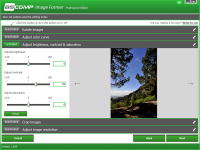
While Image Former doesn’t claim to be a replacement for heavy-duty artistic editors like Lightroom, it excels at the essential corrections that 90% of images actually need. It focuses on the "top shape" of your pictures. This includes rotating images that were captured at the wrong angle, cropping edges to remove distracting elements or to fit a specific aspect ratio, and color correction. The color correction tools are particularly useful for batches where the lighting was consistent across the set but consistently wrong.
If you have an entire folder of photos that look a bit washed out due to an overcast day, you can apply a color correction filter to the entire batch to bring back the vibrancy and contrast. This automated application of changes is where the software really shines. It ensures consistency across your entire project. If you are preparing images for a catalog or a blog post, having a uniform look is vital for branding and professionalism. Image Former makes that consistency effortless. You don’t have to "eyeball" the settings for every photo; you set the standard once, and the software enforces it across the board.
5. Streamlined Professional Workflow
Finally, we have to talk about the user experience. In the tech world, we often see "feature creep," where a simple tool becomes so bogged down with menus and sub-menus that it becomes impossible to use. Image Former avoids this trap entirely. It is a dedicated Windows tool that prioritizes a clean, logical workflow: Select, Define, Convert.
The interface is intuitive enough that a beginner can pick it up in seconds, yet powerful enough that a power user won't feel restricted. There is no steep learning curve here. You aren't hunting through dozens of toolbars to find the "crop" function. Everything is laid out to facilitate speed. In my testing, the stability of the application stands out; even when throwing large batches of high-resolution files at it, the tool remains responsive. It is a lightweight solution that doesn't hog system resources, meaning you can leave it running in the background while you continue with your other work. For anyone looking to declutter their digital life and streamline their creative process, this giveaway is an absolute "must-have."
In conclusion, Image Former is more than just a converter; it is a specialized utility that solves a very real, very common problem. It respects your time, simplifies your file management, and ensures that your images always look their best, regardless of the format or size requirements. In a world where we are constantly bombarded with visual data, having a "Swiss Army Knife" like this in your digital toolkit is essential. Don't miss out on this giveaway—once you experience the ease of batch editing, you will wonder how you ever managed your photo library without it.
Whether you're a hobbyist looking to organize a decade's worth of memories or a professional needing to prep assets on a deadline, Image Former delivers the results you need with zero fluff. It’s fast, it’s versatile, and most importantly, it’s effective. Download it, run your first batch, and reclaim the hours you used to spend on tedious manual edits. Your workflow—and your sanity—will thank you.


Reviews for Image Former Professional 2
Click Here to Read Reviews for Image Former Professional 2 >> Click Here to Submit Reviews for Image Former Professional 2 >>