What Does Website Watcher 2 Do?
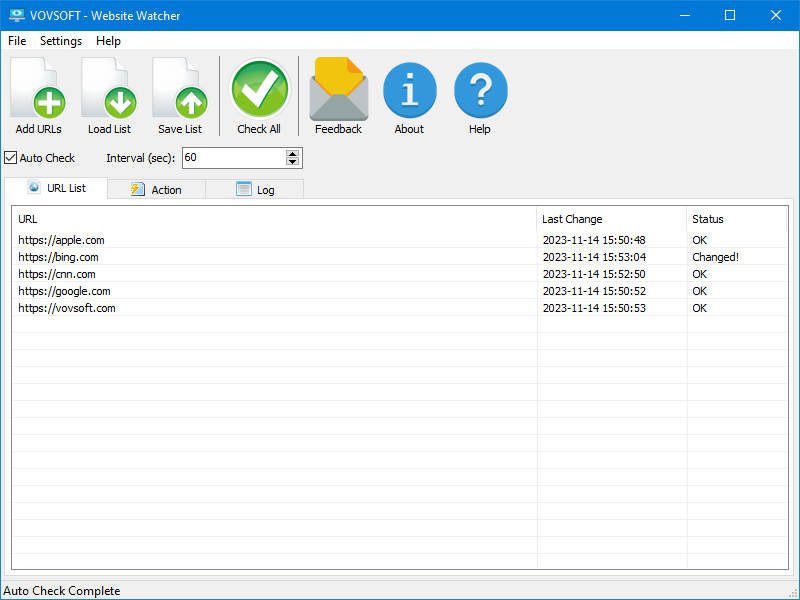
Website Watcher is a desktop-based utility designed to automate the process of tracking updates across the internet. Running as a local client rather than a cloud-based service, the software gives users direct control over their monitoring data. It is engineered to detect modifications on standard web pages, RSS feeds, and Atom feeds, providing a centralized hub for information gathering.
The application operates on a straightforward technical principle: it captures the HTML source code of a specified URL and stores it in an internal database. During subsequent scheduled checks, the tool compares the current version of the page against the stored data. If disparities are detected, the system triggers a notification. This functionality is applicable for several professional and personal use cases, including:
- Tracking price adjustments and inventory availability on e-commerce platforms.
- Monitoring competitor websites for strategic changes or new announcements.
- Following shipping status updates and postal tracking information.
- Receiving immediate alerts for time-sensitive content, such as university exam results or public notices.
The interface is built to accommodate both novice users seeking simple periodic checks and advanced users requiring more granular control. By automating these routine visits, the software eliminates the need for manual refreshing, ensuring that users are informed of relevant content changes as they occur.
Top 5 Reasons To Download Website Watcher 2
Before we dive into the deep end of why this specific utility is a must-have for your digital arsenal, let’s look at the core benefits. If you are tired of manually refreshing tabs or missing out on critical updates, here are the top 5 reasons why you need to download Website Watcher today:
- Total Data Privacy and Local Control: Unlike cloud-based services that store your monitored data on their servers, this tool runs as a local client, keeping your tracking habits and sensitive data entirely on your own machine.
- Automated Efficiency and Time Management: It eliminates "refresh button fatigue" by automatically checking pages at scheduled intervals, freeing up hours of your time every week.
- Versatile Tracking for Every Need: From monitoring RSS feeds and price drops to tracking shipping status and university exam results, its flexibility handles both professional and personal tasks with ease.
- Intuitive Simplified Workflow: The software balances powerful features with a user-friendly interface, making it accessible for beginners while providing the depth advanced users crave.
- Precision Change Detection: By comparing HTML code snapshots in an embedded database, the software ensures you only get notified when a meaningful change actually occurs, reducing notification noise.
Top 5 Reasons To Download Website Watcher 2
In the modern digital landscape, information is the most valuable currency we have. However, the sheer volume of data being updated every second across the internet makes it impossible for a human to keep up manually. We have all been there: sitting at a desk, hitting the F5 key repeatedly, waiting for a price to drop, a grade to be posted, or a competitor to update their landing page. This manual process is not just tedious; it is a massive drain on productivity. This is where Website Watcher steps in, and why this giveaway is an opportunity you cannot afford to pass up. As a tech reviewer, I see hundreds of utilities every year, but few offer the immediate, tangible ROI of a well-oiled website monitor. Let’s break down exactly why this tool deserves a permanent spot on your hard drive.
1. Unparalleled Data Privacy and Local Sovereignty
We live in an era where "the cloud" is the default. Most website monitoring services today are SaaS (Software as a Service) platforms. While convenient, they come with a significant hidden cost: your privacy. When you use a web-based service to track a page, that service knows exactly what you are interested in. They know which competitors you are watching, which products you are eyeing, and which private internal pages you might be attempting to monitor. For a business professional or a privacy-conscious individual, this is a massive red flag.
Website Watcher flips the script by operating as a local client on your computer. When you download this giveaway, you are installing a powerhouse that keeps all your "watching" data local. Your list of URLs, the frequency of your checks, and the specific changes detected are stored in an embedded database on your own hardware. There is no middleman harvesting your interests for advertising data. In an age where digital footprints are tracked at every turn, having a tool that respects the boundary of your local machine is a breath of fresh air. You have full control over the data, the logs, and the frequency of access without worrying about a third-party server breach exposing your monitoring list.
2. Automated Efficiency and Time Management
The most precious resource we have is time. If you spend even ten minutes a day checking various websites for updates, that adds up to over an hour a week—and over 60 hours a year. That is more than a full work week spent simply looking for changes that might not even be there. Website Watcher is designed to give that time back to you. The software allows you to automate the mundane task of "checking in."
The beauty of this tool lies in its scheduled intervals. You can set the software to check a page every hour, every day, or at specific times that suit your workflow. Imagine being a journalist waiting for a government press release, or a student waiting for exam results. Instead of being tethered to your browser, you can focus on other tasks, knowing that the second the HTML code on that page changes, the software will catch it. It transforms a proactive, stressful search into a passive, streamlined notification system. This is "set-it-and-forget-it" technology at its finest. By automating the monitoring process, you ensure that you are always the first to know, without having to be the one who is constantly looking.
3. Universal Tracking Capabilities for Every Scenario
One of the biggest mistakes people make is thinking that website monitors are only for "techies" or "day traders." This tool is remarkably versatile, covering a spectrum of use cases that touch almost every aspect of modern life. During my testing, I found that its ability to handle different types of content is where it truly outshines the competition. It isn't just looking at text; it can monitor RSS and Atom feeds, ensuring you get your news and blog updates the moment they are published.
Consider the retail environment. We have all dealt with the frustration of a "Sold Out" sign. With this tool, you can monitor product availability or price adjustments. If a competitor lowers their price by five percent, you’ll know. If a boutique restocks a limited-edition item, you’ll be the first in line. Beyond commerce, it is an essential tool for logistics. You can track shipment details via postal services or courier sites. Instead of manually entering a tracking number into a website five times a day, let the software do the heavy lifting. Whether it is academic updates, corporate changes, or hobbyist news, the tool's ability to digest and compare HTML code makes it a universal solution for anyone who consumes web content.
4. Intuitive Design for Every Skill Level
Many powerful monitoring tools suffer from "over-engineering." They come with steep learning curves that require knowledge of Regex, CSS selectors, or complicated scripting. Website Watcher strikes a rare balance: it is incredibly powerful under the hood, yet remarkably simple on the surface. For the beginner, the process is straightforward. You add a URL, tell the software what to look for, and it begins its work. The user interface is designed to be simplistic, ensuring that even someone who isn't "tech-savvy" can start tracking their favorite sites within minutes of installation.
However, don't let the simplicity fool you. For advanced users, the tool offers the depth required for complex monitoring tasks. The core principle—accessing a page, saving the HTML code, and comparing it to previous versions—is executed with surgical precision. It handles the nuances of web architecture effectively, allowing you to filter out the noise so you only get alerted for real changes. This user-friendly approach is why I highly recommend this giveaway. It doesn't matter if you are a power user or a casual browser; the software scales to your needs. It makes the complex task of data scraping and comparison feel like a basic desktop task.
5. The Ultimate Competitive Edge
In business, being second often means being last. Whether you are an entrepreneur, a freelancer, or a corporate strategist, having an information advantage is critical. Monitoring a competitor's homepage can tell you a lot about their upcoming strategy. Are they hiring? Are they changing their pricing tiers? Did they just launch a new marketing campaign? Website Watcher acts as your private investigator, quietly observing the digital landscape and reporting back the moment something shifts.
This "competitive edge" extends to your personal life as well. In the world of high-stakes auctions, limited-time giveaways, or even securing a spot in a crowded university course, speed is everything. By the time a manual check reveals a change, the opportunity might already be gone. This software ensures that the disparities in a webpage trigger immediate actions or notifications, giving you the window of opportunity you need to act. Downloading this giveaway isn't just about getting a free piece of software; it’s about equipping yourself with a tool that provides a faster reaction time than anyone relying on manual browsing. In a fast-paced world, this tool is the equalizer that puts you ahead of the curve.
The Mechanics of How It Works
To truly appreciate why you should download this, it is helpful to understand the elegant simplicity of its operation. When you add a site to Website Watcher, the program fetches the HTML source code of that page. This code is the "skeleton" of the website. The software then stores this code in its internal database. On the next scheduled visit, the software fetches the code again and performs a bit-by-bit comparison. If the code is identical, nothing happens. If there is a disparity, the software flags it.
Why is this better than a simple browser notification? Because it looks at the underlying structure. This means it can detect changes that might not be immediately visible to the naked eye but are crucial for data analysis. It also means the tool is lightweight. It isn't loading heavy images or video content every time it checks; it is looking at the data that matters. This efficiency makes it perfect for running in the background of your system without hogging resources or slowing down your other applications.
A Reviewer’s Final Verdict
As someone who spends most of my day navigating the complexities of new software, I am always looking for tools that solve a real problem without creating new ones. Website Watcher is a rare example of a utility that does exactly what it says on the tin, and it does it with a level of reliability that is hard to find. The fact that it is currently available as a giveaway makes it an absolute "no-brainer" for anyone who uses a computer.
We often ignore how much mental energy we expend on "waiting." Waiting for an email, waiting for a site update, waiting for a price drop. This mental "background task" drains our creativity and focus. By delegating these tasks to Website Watcher, you are effectively outsourcing your digital vigilance. You are telling your computer, "You watch the door, and let me know if someone knocks." This allows you to reclaim your focus for the things that actually require human intelligence and creativity.
In conclusion, the combination of privacy, automation, versatility, simplicity, and competitive advantage makes this tool a standout. It’s a powerful ally for the student, the shopper, the professional, and the researcher alike. Don't wait for the next time you find yourself manually refreshing a page in frustration. Download Website Watcher now, set up your first few monitors, and experience the peace of mind that comes with knowing the information you need will find you the moment it exists. This is one giveaway that will pay dividends in time saved and opportunities seized for years to come.
Final Tip: When you first install the software, start by adding a few of your most-visited sites or a tracking number for a package you are expecting. Once you see the first notification pop up without you having to lift a finger, you will wonder how you ever managed your digital life without it. This is the hallmark of a great tool—it becomes indispensable the moment you start using it. Don't miss out on this chance to upgrade your digital workflow for free.

Reviews for Website Watcher 2
Click Here to Read Reviews for Website Watcher 2 >> Click Here to Submit Reviews for Website Watcher 2 >>