What Does HTML Stripper Do?
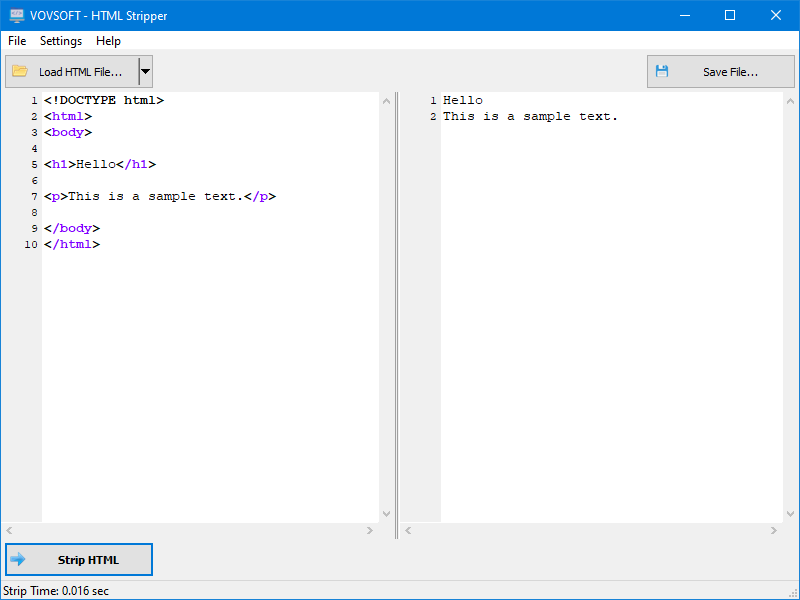
HTML Stripper is a streamlined utility designed to convert Hyper Text Markup Language into plain, readable text. The software functions as an HTML tag stripper and extractor, allowing users to remove formatting, JavaScript snippets, and CSS styles from any block of code. By processing complex HTMLified text, the tool generates a clean string of data that is stripped of the underlying markup required for web layout.
The application addresses common challenges faced by content creators and developers. When publishing articles on third-party platforms with strict content limitations, users often need to sanitize text by removing restricted tags. HTML Stripper automates this process, saving significant time compared to manual cleaning. It is particularly effective at handling various markup formats generated by different WYSIWYG editors, ensuring that the resulting text is consistent and devoid of custom formatting.
Key capabilities of the software include:
- Removal of all HTML tags and attributes.
- Elimination of embedded JavaScript code and CSS styles.
- Extraction of plain text content from web-based sources.
- Quick conversion via a simplified user interface.
This tool serves as a practical solution for anyone needing to transform formatted code into human-readable text for use in other applications or databases. By providing a HTML2TXT conversion path, the software enables users to bypass manual editing when working with messy or over-formatted source material.
Top 5 Reasons To Download HTML Stripper
- Instant Elimination of Code Bloat: Effortlessly strip away HTML tags, JavaScript snippets, and CSS styles to reveal pure, readable text.
- Significant Productivity Boost: Save hours of manual editing by automating the conversion of messy web data into clean strings.
- Platform Compatibility Mastery: Ensure your content fits perfectly into restrictive CMS editors and third-party websites that forbid custom formatting.
- High-Precision Text Extraction: Isolate the actual content you need from complex web layouts without capturing unwanted layout elements.
- Lightweight and Zero-Learning-Curve Design: Benefit from a powerful utility that requires no technical expertise and functions with a single click.
If you have ever spent a frustrating afternoon copying content from a website only to find your document filled with strange brackets, erratic font sizes, and stubborn blue links, then you already know the struggle of the modern digital workspace. We live in a world built on HTML, but we work in a world that requires plain, readable text. This disconnect is exactly why Vovsoft created the HTML Stripper, a specialized tool designed to bridge the gap between the complex "back-end" of the internet and the "front-end" of your professional workflow. As a tech reviewer, I see hundreds of utilities that claim to simplify your life, but few are as laser-focused and effective as this one. This isn't just a simple utility; it is an essential part of a refined digital toolkit.
1. Instant Elimination of Code Bloat
The primary reason you need to download this giveaway is the sheer power it has to dismantle "code bloat." When we browse the web, what we see is a beautiful, rendered interface. However, behind that interface lies a chaotic architecture of Hyper Text Markup Language (HTML), Cascading Style Sheets (CSS), and JavaScript. When you try to copy a simple paragraph from a modern website, you aren't just getting the words. You are often grabbing hundreds of lines of hidden metadata, styling instructions, and script references. If you paste that into a text editor or a different web platform, the results are often disastrous.
The HTML Stripper acts as a high-powered industrial filter for your content. It identifies the tags—those pesky items like "div," "span," "href," and "script"—and discards them instantly. What is left behind is the "meat" of the content. This software doesn't just hide the code; it removes it entirely. By using this tool, you ensure that your text is clean and pretty, exactly as it was meant to be read. It transforms "ugly formatted" or "HTMLified" text into something that is human-readable in a matter of milliseconds. For anyone who deals with data entry, content curation, or research, the ability to neutralize code bloat instantly is a game-changer that prevents technical errors before they even happen.
2. Significant Productivity Boost
We often talk about "time-saving" software, but let's look at the actual math of your workday. If you are a content creator, a lawyer, a student, or an administrative professional, you likely spend a significant portion of your day moving information from one place to another. Manual cleaning is a soul-crushing task. Imagine having to go through a 2,000-word document and manually deleting every "<p>" tag or every inline style attribute. It could take thirty minutes, an hour, or even more depending on the complexity of the source code. Even using "Find and Replace" functions in standard word processors is hit-or-miss because of the variety of tags used in modern web design.
The HTML Stripper is designed for people who want to save a massive amount of time. By automating the cleaning process, you reduce a task that takes an hour down to a task that takes a single click. In the tech world, we call this "removing friction." When you remove friction from your workflow, you aren't just working faster; you are working smarter. You are freeing up your mental energy to focus on the quality of your writing or the accuracy of your data, rather than the tedious mechanics of formatting. This software is an investment in your own efficiency, ensuring that you never have to waste another second fighting with a piece of stubborn code that doesn't want to be unformatted.
3. Platform Compatibility Mastery
One of the most common "nightmare scenarios" for digital professionals is the restrictive Content Management System (CMS). Many of us find ourselves in situations where we need to publish articles or data on websites that we do not control. This might be a corporate intranet, a public forum, or a third-party guest posting site. These platforms often have incredibly strict limitations on what kind of HTML they will accept. Some will reject your entire submission if it contains a single "div" tag or a "style" attribute that their system doesn't recognize.
Furthermore, many What-You-See-Is-What-You-Get (WYSIWYG) editors are notorious for mangling code. If you paste formatted text from a website into one of these editors, it often tries to "nest" the old formatting inside the new formatting, creating a visual mess that is impossible to fix. This is where the HTML Stripper becomes your best friend. By stripping all tags and custom markup before you paste, you are providing the destination platform with a "blank slate." This ensures that the destination's own CSS and styling will apply correctly, without any ghost code from the original source interfering with the layout. It makes you a more versatile contributor and ensures that your work looks professional and polished, regardless of where it is being published.
4. High-Precision Text Extraction
Modern websites are no longer just documents; they are complex applications. When you attempt to extract text from a site, you are often fighting against a wall of layout elements. A simple news article might be surrounded by navigation bars, sidebar widgets, footer links, and advertisement placeholders. If you use a standard "Select All" and "Copy," you end up with a mountain of garbage data that you then have to sift through. This is particularly problematic if you are trying to extract specific strings or data points for a spreadsheet or a database.
This software is not just a stripper; it is an extractor utility. It is designed to pull the human-readable text out of the digital noise. Because different applications and editors use all sorts of different markup—some of it very non-standard—having a dedicated tool that knows how to identify and isolate text is invaluable. Whether you are extracting a list of products, a series of testimonials, or the core text of a research paper, this tool ensures that you get exactly what you want and nothing else. It treats the HTML as the "packaging" and the text as the "gift," allowing you to throw away the box and keep what is inside. This level of precision is something that generic text editors simply cannot provide.
5. Lightweight and Zero-Learning-Curve Design
In an era where software is becoming increasingly bloated, with endless menus, "cloud" requirements, and subscription models, there is something deeply refreshing about the Vovsoft philosophy. The HTML Stripper is a lightweight, purpose-built application. It does not try to be a photo editor, a web browser, and a social media platform all at once. It does one thing—convert HTML to text—and it does it better than anything else on the market. This simplicity is its greatest strength.
From the moment you download and open the application, the interface is intuitive. There are no complex tutorials to watch and no thick manuals to read. All you have to do is click a button—and voila! Your messy code is gone. This makes it the perfect tool for users of all skill levels. Whether you are a seasoned web developer who needs to quickly clean up a snippet of code or a non-technical user who just wants to copy a recipe without the surrounding website clutter, this tool is accessible to you. It doesn't bog down your system resources, it doesn't require a constant internet connection, and it stays out of your way until you need it. In the world of tech, we often say that "less is more," and this utility is the perfect embodiment of that principle.
Conclusion: Why You Should Not Wait
We often ignore the small "points of pain" in our daily digital lives. We tell ourselves that taking five minutes to clean up a document isn't a big deal. But those five minutes add up over a week, a month, and a year. More importantly, those five minutes of tedious, manual work are moments where we are not being creative or productive. We are acting like machines, performing a repetitive task that a piece of software could do in a heartbeat.
The HTML Stripper is the solution to a problem you might not even realize is holding you back. It is about more than just "removing tags." It is about digital hygiene. It is about ensuring that your data is clean, your workflow is fast, and your content is compatible with the entire world of digital publishing. As a tech reviewer, I always recommend tools that solve a specific, real-world problem with elegance and simplicity. This software fits that description perfectly.
Imagine the freedom of being able to grab any piece of information from the web and knowing, with absolute certainty, that you can turn it into clean, usable text in less than a second. Imagine never again having to troubleshoot a broken layout caused by a hidden "span" tag from a website you visited three hours ago. This is the peace of mind that this giveaway offers. It is a utility that you will find yourself using every single day, often several times a day, until you wonder how you ever managed to work without it.
The internet is only getting more complex. Website code is becoming more layered and more difficult to navigate. As the "noise" of the digital world increases, the value of a tool that can provide you with "signal"—the pure, unadulterated text—becomes immeasurable. This is a must-have download for anyone who values their time and their sanity in the digital age. Don't let your productivity be held hostage by messy code. Take control of your text and simplify your workflow today. This HTML code stripper is the efficient, quick, and easy way to transform your digital experience, turning the "ugly" into the "pretty" with the simple click of a button.
Final Verdict: This is a quintessential "Swiss Army Knife" tool for the modern era. It is fast, it is effective, and it solves a universal problem. Download it, add it to your arsenal, and start enjoying the benefits of clean, human-readable text immediately. You won't regret making this small but powerful addition to your software collection.

Reviews for HTML Stripper
Click Here to Read Reviews for HTML Stripper >> Click Here to Submit Reviews for HTML Stripper >>