What Does DoYourData Recovery Pro for Mac Do?
Do Your Data Recovery for Mac Professional is a data restoration utility designed to retrieve lost or inaccessible files from Apple hardware and associated storage media. The software addresses data loss resulting from accidental deletion, disk formatting, partition corruption, and operating system crashes. It performs sector-by-sector scans to identify recoverable files across internal hard drives, external disks, USB flash drives, and digital cameras.
Users can utilize two distinct scanning modes depending on the severity of the data loss. Quick Recovery targets recently deleted files and emptied trash bins, while Advanced Recovery conducts a deeper analysis to locate data from lost volumes or corrupted drives. The software supports a wide range of file formats, including:
- Multimedia: Photos, videos, and audio files.
- Documents: Spreadsheets, presentations, and word processing files.
- Archives: Emails, compressed folders, and system files.
The application is compatible with iMac, MacBook, MacBook Pro, and MacBook Air models. It supports legacy and modern environments ranging from Mac OS X 10.6 through OS X 10.11, including OS X Server. The recovery process follows a standardized three-step workflow to identify, preview, and restore files to a safe location. This utility is engineered to function regardless of whether the data was lost due to a virus infection, power failure, or hardware error.
Top 5 Reasons To Download DoYourData Recovery Pro for Mac
- Universal Data Loss Coverage: It tackles everything from simple accidental deletions to complex hard drive formatting and partition losses.
- Dual-Mode Scanning Power: Features both a lightning-fast Quick Recovery and a deep-diving Advanced Recovery for sector-by-sector analysis.
- Broad File and Device Support: Recovers photos, videos, documents, and more from internal drives, external SSDs, USB sticks, and SD cards.
- Streamlined 3-Step Workflow: An incredibly intuitive interface designed to get your files back in minutes without a steep learning curve.
- Specialized Partition and OS Recovery: Capable of retrieving data from lost volumes or after a catastrophic OS upgrade or crash.
We have all been there. It is that cold, sinking feeling in the pit of your stomach when you realize you just hit "delete" on a folder that contained three years of family photos, or when your Mac suddenly informs you that your external drive "is not readable." In the world of tech, data loss isn't just a possibility; for most of us, it is an eventual certainty. Whether it is a hardware failure, a software glitch, or just a moment of human error, the loss of digital assets can be devastating. This is exactly why Do Your Data Recovery for Mac Professional is a tool you need in your arsenal right now. As a tech reviewer who has tested dozens of recovery utilities, I can tell you that finding a balance between professional-grade power and consumer-grade simplicity is rare. This giveaway is your chance to secure a safety net that is usually reserved for high-end IT departments.
In this deep dive, I am going to explain exactly why this software stands out in a crowded market and why you should take advantage of this download today. If you value your digital life, you need to understand the mechanics of how your data is saved and, more importantly, how it can be saved from the brink of permanent deletion.
1. Universal Data Loss Coverage
The first and perhaps most compelling reason to grab this software is its sheer versatility in handling different data loss scenarios. Most basic recovery tools are only good for one thing: finding a file you accidentally moved to the Trash. But real life is much messier than that. Do Your Data Recovery for Mac Professional is designed to be a comprehensive "rescue mission" for your data, regardless of how it went missing.
Think about the last time you formatted a drive. Maybe you were trying to clear off an old USB stick to make room for a movie, but you accidentally selected your backup drive instead. In most cases, a standard "format" command tells the operating system that the space is now empty, even though the data is still physically there. This software specializes in Formatted Recovery, allowing it to look past the "empty" label and see the actual bits and bytes that remain on the platter or flash chips. It can handle reformatted or even erased drives, pulling your files back from the digital void.
Furthermore, it excels at Raw Recovery. This is a technical term for when your hard drive becomes "RAW" or inaccessible due to file system corruption. When the directory of your drive is broken, your Mac doesn't know where any file begins or ends. This software ignores the corrupted directory and scans the drive's physical sectors to reconstruct your files. Whether the loss was caused by a virus attack, an improper drive ejection, or a sudden power failure, this tool treats every scenario with the same level of professional rigor.
2. Dual-Mode Scanning Power
One of the biggest complaints users have with data recovery software is the time it takes. If you are looking for a document you deleted ten minutes ago, you don't want to wait six hours for a full disk scan. This is where the dual-mode scanning technology of Do Your Data Recovery for Mac Professional really shines. It offers two distinct levels of searching: Quick Recovery and Advanced Recovery.
The Quick Recovery mode is your first line of defense. It is optimized for speed, scanning the file system's index to find files that have been recently deleted or emptied from the Trash. In many cases, this scan takes only a few seconds or minutes. It is the perfect "oops" button for daily mistakes. Because it targets the most accessible layers of the file system, it is remarkably efficient and allows you to get back to work almost instantly.
However, if the data loss is more severe—perhaps the drive was formatted or the files were lost a long time ago—the Advanced Recovery mode takes over. This is a sector-by-sector scan. Imagine a librarian looking for a book. Quick Recovery is like checking the library's digital catalog. Advanced Recovery is like the librarian walking through every single aisle and looking at the cover of every single book to find what you need. It takes longer, but it is incredibly thorough. It can find "orphaned" files that no longer have a directory entry, ensuring that if the data is physically present on the disk, it will be found. Having both options in one package means you have the right tool for both minor hiccups and major disasters.
3. Broad File and Device Support
As Mac users, we don't just use our internal hard drives. Our workflow involves a massive ecosystem of peripherals. You might have photos on a digital camera's SD card, old archives on a portable hard drive, or school projects on a USB thumb drive. A recovery tool is only as good as the devices it supports. Do Your Data Recovery for Mac Professional is a true polymath in this regard.
It doesn't matter if you are using an iMac, a MacBook Pro, or an ultra-portable MacBook Air; the software is fully compatible with the hardware. Beyond the Mac itself, it supports virtually every type of removable storage media. This is crucial for photographers and videographers. If you have ever had an SD card "corrupt" in the middle of a shoot, you know how terrifying that is. This software can interface with those cards and pull those priceless shots back. It even supports digital cameras, MP3/MP4 players, and external SSDs.
But it isn't just about the where; it is about the what. This tool supports all major file types. We are talking about photos (JPG, PNG, RAW, TIFF), videos (MP4, MOV, AVI), audio files, documents (PDF, Word, Excel, Keynote), emails, and even compressed archives (ZIP, RAR). Many recovery tools struggle with proprietary Mac formats or high-end video codecs, but this professional version is built to recognize the headers of a vast array of file signatures, making it a one-stop shop for all your recovery needs.
4. Streamlined 3-Step Workflow
Technical software often suffers from a "UI problem." It is frequently designed by engineers for engineers, resulting in a confusing mess of buttons, command-line prompts, and obscure settings. Do Your Data Recovery for Mac Professional takes the opposite approach. It follows a philosophy of "powerful tech, simple interface." The entire recovery process is distilled into three simple steps.
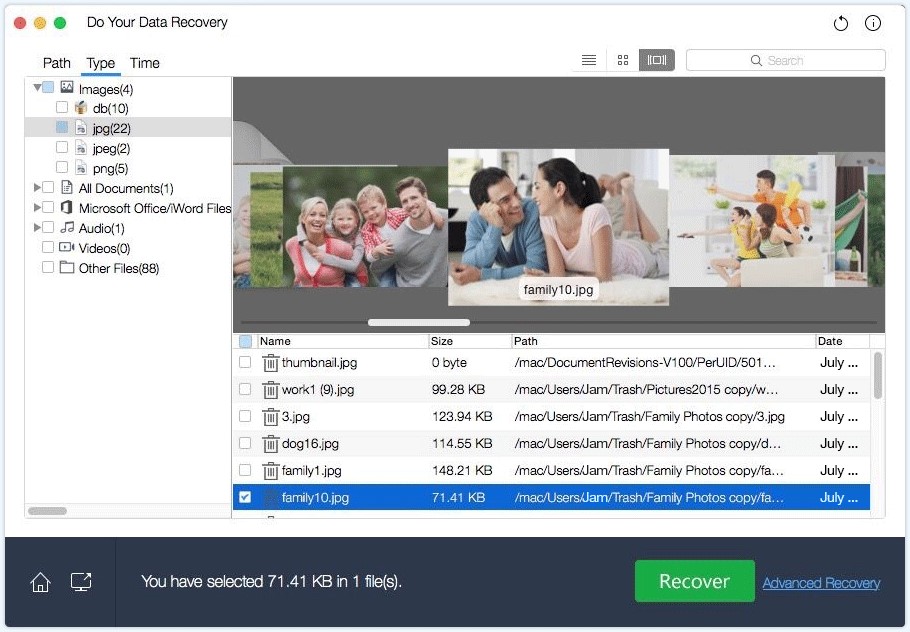
The first step is Select. You simply open the app and choose the drive or partition where your data was lost. The interface clearly lists all connected drives, making it impossible to pick the wrong one. The second step is Scan. You choose your scan mode (Quick or Advanced) and let the software do the heavy lifting. You can even see the files being found in real-time. The third and final step is Recover. You browse the found files, which are neatly organized by file type, preview them to make sure they are intact, and click the recover button to save them to a safe location.
The preview feature is a massive time-saver. Before you commit to the recovery process, you can actually see the photos or read the documents within the app. This ensures that you aren't wasting time recovering corrupted fragments or the wrong files. For someone who isn't a "techie," this 3-step process removes the anxiety of data recovery. It turns a high-stress situation into a manageable task that anyone can handle.
5. Specialized Partition and OS Recovery
Finally, we need to talk about the "nightmare scenarios" that most basic apps can't touch. Sometimes, it isn't just a file that goes missing—it is an entire volume or partition. You might open Disk Utility and see that a whole chunk of your drive is simply "unallocated" or missing. Do Your Data Recovery for Mac Professional features a dedicated Lost Volume Recovery mode. It can scan the hard drive for "ghost" partitions that have been deleted or damaged and rebuild the file structure within them. This is high-level data forensics made accessible to the average user.
Additionally, we live in an era of frequent OS updates. While macOS is generally stable, OS X upgrades, crashes, or re-installations can occasionally lead to data loss. Perhaps the installer encountered an error and wiped your user directory, or a system crash during a file transfer corrupted the file system. This software is specifically optimized to handle OS X Recovery. It is compatible with a wide range of versions, from the classic Mac OS X 10.6 (Snow Leopard) all the way through the later versions of OS X and OS X Server. This legacy support is a testament to the software's stability and the depth of its development.
By downloading this giveaway, you aren't just getting a tool; you are getting a digital insurance policy. You are getting the ability to undo mistakes that would otherwise be permanent. In my years of reviewing software, I have found that the best time to get data recovery software is before you need it. Once a drive fails or a file is deleted, downloading software to that same drive can actually overwrite the data you are trying to save. By having Do Your Data Recovery for Mac Professional installed and ready to go, you ensure that you are prepared for the worst-case scenario the moment it happens.
In conclusion, this software is a powerhouse. It combines raw scanning power with an elegant interface and unmatched compatibility. Whether you are a student trying to save a thesis, a professional photographer protecting a client's wedding photos, or just a home user who wants to keep their memories safe, this is a download you cannot afford to miss. Don't wait for the disaster to happen—prepare yourself today with the most reliable data recovery tool available for the Mac platform.
It is rare to see professional-grade tools like this offered in a giveaway. The ability to perform sector-by-sector scans and recover lost partitions is worth its weight in gold when your data is on the line. I highly recommend that every Mac user adds this to their Applications folder immediately. It is safe, it is reliable, and most importantly, it works.


Reviews for DoYourData Recovery Pro for Mac
Click Here to Read Reviews for DoYourData Recovery Pro for Mac >> Click Here to Submit Reviews for DoYourData Recovery Pro for Mac >>