What Does Amigabit Disk Defrag Do?
Amigabit Disk Defrag is a system utility designed to optimize hard drive performance by reorganizing scattered data fragments. The software streamlines file access by aligning related data blocks and consolidating free space into contiguous segments, which helps prevent future fragmentation on mechanical drives.
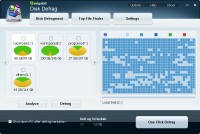
Users can execute a one-click defrag for immediate maintenance or manage specific volumes by selecting individual disks for analysis. The application includes a filter to skip excessively large files, reducing the time required for a full system scan. For ongoing maintenance, Amigabit Disk Defrag supports automated scheduling. Users can set the tool to run during idle periods or at specific intervals—such as daily or weekly—and configure the system to shut down automatically once the process concludes.
Beyond its core defragmentation capabilities, the software includes a utility to identify and manage large files. This feature scans hard disks for significant data consumers, allowing users to move or delete files to reclaim storage space. Key features include:
- Multiple Disk Support: Defragment individual partitions or entire systems simultaneously.
- Intelligent Scheduling: Run tasks during off-peak hours or when the PC is idle.
- Free Space Merging: Consolidates empty sectors to improve write speeds for new files.
- Large File Finder: Locates and manages oversized files to free up disk capacity.
- Auto-Shutdown: Automatically powers down the computer after the defragmentation process is finished.
Top 5 Reasons To Download Amigabit Disk Defrag
- Blazing Fast and Intelligently Optimized Defragmentation: A one-click solution that doesn't just move files, but merges free space to prevent future slowdowns.
- Granular Control Over Your Storage: The ability to target specific disks or skip massive files ensures you aren't wasting hours on unnecessary tasks.
- Complete "Set It and Forget It" Automation: Robust scheduling options allow the software to maintain your PC's health while you sleep or work.
- Smart Post-Task Management: Features like automatic shutdown mean you can start a deep optimization and walk away, knowing your PC will power down safely when finished.
- Integrated Large File Identification: Beyond just defragging, it acts as a system cleaner by hunting down space-hogging files you didn't even know were there.
If you have been using your computer for more than a few months, you have likely noticed a phenomenon that plagues every PC owner: the slow crawl. It starts subtly. Maybe a folder takes a half-second longer to open. Perhaps your favorite game takes an extra minute to load the main menu. Eventually, your once-snappy machine feels like it is wading through molasses. Most users assume they need a new computer or a RAM upgrade, but often, the culprit is much simpler and purely organizational. Your hard drive is a mess. This is where Amigabit Disk Defrag comes in, and today, I am going to tell you exactly why this specific giveaway is the utility your system has been screaming for.
As a tech reviewer, I see a lot of "optimizer" software. Much of it is "bloatware" that does more harm than good. However, disk defragmentation remains one of the most fundamental maintenance tasks for any mechanical hard drive. When Windows writes data to your disk, it doesn't always put the whole file in one neat line. It scatters pieces across the physical platters. When you try to read that file, your hard drive's physical head has to jump all over the place to find the pieces. Amigabit Disk Defrag solves this by physically reorganizing that data into contiguous blocks. It is like taking a messy library where books are torn apart and scattered across different floors and putting them back on the shelves, perfectly bound and in alphabetical order. Let’s dive into the five major reasons why this software is a must-download.
1. Blazing Fast and Intelligently Optimized Defragmentation
The primary reason anyone looks for a defrag tool is speed, but not all defragging is created equal. The built-in Windows tool is notorious for being "basic." It does the bare minimum. Amigabit Disk Defrag, however, offers a level of optimization that actually makes a tangible difference in boot times and application launches. What sets it apart is the one-click defrag option. We are all busy. Sometimes you notice your system lagging right before an important meeting or a gaming session. You don't have three hours to wait for a full system sweep. Amigabit allows you to hit one button and perform a quick optimization that targets the most critical areas of your drive.
Furthermore, it doesn't just focus on the files themselves; it focuses on the gaps between the files. By merging scattered pieces of free space into a single, contiguous block, it ensures that the next time you save a file, Windows has a nice, long, empty runway to write it on. This prevents fragmentation before it even happens. This proactive approach to file management is the hallmark of professional-grade software. You aren't just cleaning up the past; you are optimizing for the future. When you use this tool, you are essentially giving your hard drive a "refresh" that makes it feel brand new, reducing the physical wear and tear on the drive’s moving parts and extending its overall lifespan.
2. Granular Control Over Your Storage
One of the biggest frustrations with entry-level system tools is the "all or nothing" approach. Many tools force you to scan your entire system, which, if you have multiple multi-terabyte drives, can take an eternity. Amigabit Disk Defrag understands that power users need granular control. This software allows you to select individual disks for defragmentation. If your C: drive (where your OS lives) is feeling slow, but your D: drive (where you keep your movies) is fine, you can target only the problem area.
Even more impressive is the ability to preset the software to skip huge files. Why is this important? Because very large files—like 50GB 4K video files or massive compressed archives—take a massive amount of time to move and often don't benefit much from defragmentation because they are usually accessed sequentially anyway. By skipping these "behemoths," Amigabit finishes its job in a fraction of the time. This level of customization ensures that you are the one in charge of your system's maintenance schedule, not the software. It respects your time and your hardware's resources, making it a much more efficient choice than the standard tools that come pre-installed on your PC.
3. Complete "Set It and Forget It" Automation
The best kind of maintenance is the kind you don't have to remember to do. Let's be honest: no one wakes up on a Tuesday morning and thinks, "I can't wait to defragment my hard drive today." It is a chore, and like all chores, it gets forgotten. This leads to a gradual decline in performance that you might not even notice until it's too late. Amigabit Disk Defrag removes the human element of error with its robust scheduling engine.
Within the interface, you can tell the software exactly when to work. Do you want it to run every night at 3:00 AM? You can do that. Do you want it to run once a week on Sunday afternoons? Done. But the real "killer feature" here is the idle-time defrag. You can set the software to monitor your PC's activity. When you walk away to grab a coffee or take a phone call, Amigabit notices the CPU usage has dropped and quietly begins its work in the background. As soon as you move the mouse or touch a key, it pauses, staying out of your way. This ensures your computer is always at peak performance without you ever having to click a single button. It is the ultimate "set it and forget it" solution for system health.
4. Smart Post-Task Management
We have all been there: you start a system update, a virus scan, or a disk defrag, and then you realize you have to go to bed or leave the house. You don't want to leave your computer running for another five hours just to finish one task, but you also don't want to cancel the progress you've already made. Amigabit Disk Defrag solves this dilemma with its integrated automatic shutdown feature.
This is a small but incredibly thoughtful addition that shows the developers actually use their own software. You can kick off a deep, thorough defragmentation of all your drives before you go to sleep, check the "Shut down computer when finished" box, and walk away. The software will meticulously reorganize your data, and once the final bit is in place, it will perform a clean shutdown of your OS. This saves electricity, protects your hardware from staying on unnecessarily, and means that when you wake up the next morning and power on your PC, you are greeted with a fresh, fast, and fully optimized machine. It is a seamless experience that caters to the reality of how we use our technology.
5. Integrated Large File Identification
This is the feature that really pushes Amigabit Disk Defrag over the top and makes it a "must-download." Most defrag tools are one-trick ponies; they move files and that's it. Amigabit includes a built-in Large File Finder. Over time, our hard drives become digital attics, filled with forgotten ISO files, ancient game installers, and duplicate video files that we no longer need. These large files are often the reason we run out of space, yet they are buried deep in nested folders where we never look.
The Large File Finder scans your disks and presents you with a list of the biggest space-hogs on your system. It doesn't just show them to you; it gives you the tools to manage them. You can jump directly to the folder where the file lives, move it to an external drive to save space, or delete it straight to the Recycle Bin. When you combine this with disk defragmentation, you aren't just making your drive faster—you are making it larger and more organized. It is a two-pronged attack on system clutter. First, you find and delete the junk you don't need, and then you defragment the important stuff that remains. The result is a level of system responsiveness that you simply cannot get from a single-purpose tool.
The Verdict from the Reviewer's Desk:
In an era where we demand instant gratification from our devices, a slow hard drive is more than just an annoyance; it is a productivity killer. While Solid State Drives (SSDs) have changed the landscape, millions of us still rely on traditional Hard Disk Drives (HDDs) for our mass storage, our game libraries, and our media collections. Even on an SSD, keeping files organized and free space consolidated is a best practice for system health. Amigabit Disk Defrag takes a complex, technical necessity and wraps it in a user interface that is accessible to everyone, from the casual user to the hardcore tech enthusiast.
What I love most about this giveaway is that it isn't just a utility; it's a performance insurance policy. By downloading this, you are ensuring that your hardware lives longer, your software runs faster, and your frustration levels stay low. The combination of high-speed optimization, deep customization, automated scheduling, and the bonus large file manager makes this one of the most comprehensive packages in its class.
Don't wait until your computer starts freezing or making that dreaded clicking sound of a struggling drive. Proactive maintenance is the secret to a long-lasting PC. Amigabit Disk Defrag gives you all the professional tools you need to keep your system in top-tier shape. It is fast, it is efficient, and it is incredibly easy to use. Download this giveaway now and give your hard drive the digital tune-up it deserves. You will feel the difference from the very next time you hit the power button. Your PC will thank you, and your workflow will never be the same again.
In conclusion, if you value your time and your data, there is no reason to pass this up. It represents the pinnacle of disk management software, offering a suite of features that go far beyond the basic expectations of a defragger. It is a complete toolkit for the modern computer user who wants to get the most out of their hardware. Grab it while it’s available and experience the speed for yourself!


Reviews for Amigabit Disk Defrag
Click Here to Read Reviews for Amigabit Disk Defrag >> Click Here to Submit Reviews for Amigabit Disk Defrag >>