What Does Ashampoo Zoom #2 Do?
ZOOM #2 is a specialized image scaling utility designed to enlarge photographs while maintaining structural integrity. Utilizing Super Symmetric Smart Patches (SSSP) technology, the software leverages deep learning to scale images by up to 20,000%. It supports a maximum output of 500 megapixels and provides native RAW support for 1,292 different camera models.
The software incorporates several specialized optimization layers to manage image quality during the enlargement process:
- Five quality levels and five gamma aliasing settings.
- Integrated blur correction for contour reconstruction.
- Super-sampling technology for natural-looking enlargements.
- Artifact reduction for compressed JPEG files.
Users can refine results through 14 image presets and 24 size templates. A notable feature is the extensible AI, which allows users to train the underlying neural network using their own image data for customized optimization. The interface includes an assistance system that monitors system resources, providing real-time feedback on memory usage and estimated calculation times.
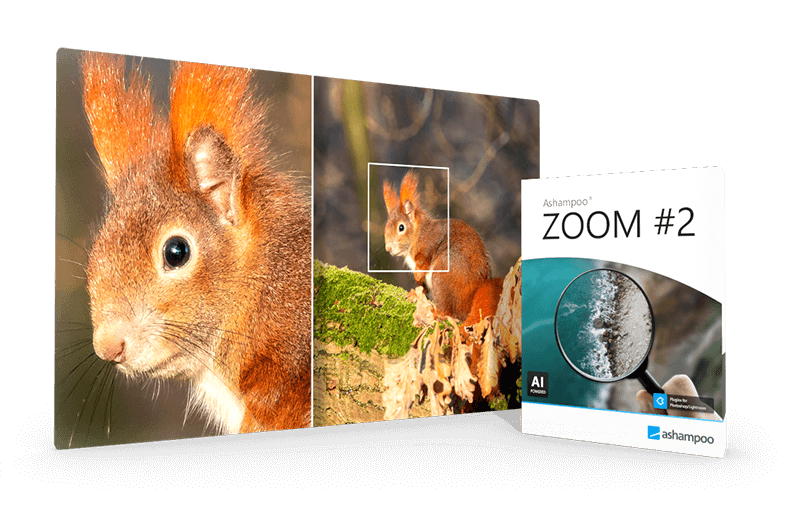
Functionality extends to precise image cropping and adjustable scaling units, including centimeters, millimeters, inches, and pica. A comparison view with an integrated magnifying glass allows for side-by-side evaluation of the original and processed files, facilitating high-resolution outputs for large-format prints, document restoration, or detailed section enlargements.
Top 5 Reasons To Download Ashampoo Zoom #2
If you have ever tried to enlarge a photo only to end up with a blurry, pixelated mess, then you know the frustration of traditional image scaling. Most software simply "guesses" what the missing pixels should look like, resulting in soft edges and digital noise. However, ZOOM #2 changes the game entirely. By utilizing cutting-edge Deep Learning and SSSP technology, this software allows you to blow up images to sizes you previously thought impossible while maintaining professional-grade sharpness. Here are the top five reasons why you need to download this giveaway immediately:
- Revolutionary SSSP Deep Learning Technology: Unlike standard interpolation, ZOOM #2 uses Super Symmetric Smart Patches to intelligently reconstruct image details.
- Unprecedented Scaling Power: You can scale your images by up to 20,000% or up to a staggering 500 megapixels without losing contour integrity.
- Extensible AI Training: You aren't just stuck with the factory settings; you can actually "train" the AI with your own images to improve results for your specific photography style.
- Professional RAW Support for 1,292 Cameras: This is a serious tool for photographers, offering native support for nearly every RAW format on the market.
- Intelligent Assistance and Real-Time Optimization: With built-in blur correction, artifact reduction, and a real-time settings assistant, the software does the heavy lifting for you.
1. Revolutionary SSSP Deep Learning Technology
In the world of digital imaging, the term "upscaling" often carries a negative connotation. We have all seen the results of bicubic or linear interpolation: the image gets bigger, but it also gets muddier. The edges lose their crispness, and the fine textures—like skin pores, fabric weaves, or distant foliage—turn into a watercolor-like smear. This is where ZOOM #2 separates itself from the pack. The heart of this application is the SSSP (Super Symmetric Smart Patches) technology. This isn't just a fancy marketing acronym; it represents a fundamental shift in how pixels are generated.
SSSP is based on state-of-the-art deep learning methods. The software has been "trained" on millions of high-resolution images to understand the relationship between pixels. When you ask the software to enlarge a photo, it doesn't just stretch the existing data. Instead, it analyzes the "patches" of the image and uses its neural network to predict what the high-resolution version of that specific texture should look like. Because the patches are "super symmetric," the AI maintains a level of geometric consistency that traditional scaling methods simply cannot replicate. This results in an enlargement that feels natural, sharp, and incredibly detailed.
As a tech reviewer, I’ve seen many AI upscalers, but the implementation of SSSP in ZOOM #2 is particularly impressive because it balances speed with precision. You aren't just getting a "blurred and sharpened" look; you are getting a reconstruction of the original scene. Whether you are working with a low-resolution vintage photo or a modern smartphone shot that needs to be printed on a large canvas, this technology ensures that the transition from small to large is seamless. This level of sophisticated math is usually reserved for high-end forensic tools or expensive enterprise software, but with this giveaway, you get that power right on your desktop.
2. Unprecedented Scaling Power
Most consumer-grade photo editors start to fall apart once you go beyond 200% or 400% enlargement. ZOOM #2 laughs at those limitations. We are talking about a scaling factor of up to 20,000%. To put that into perspective, you could take a small icon-sized image and turn it into a high-definition wallpaper. While most users might not need to go to the absolute extreme of 20,000%, the fact that the engine is capable of such feats speaks volumes about its stability and the quality of its underlying algorithms.
Beyond the percentage, the software supports an output size of up to 500 megapixels. In a world where even high-end professional cameras usually cap out at 45 to 60 megapixels, the ability to generate a 500-megapixel file is a massive advantage for anyone involved in large-format printing. If you are a graphic designer tasked with creating a billboard from a stock photo that is only 3,000 pixels wide, ZOOM #2 is your secret weapon. You can scale the image to the required dimensions while the integrated blur correction automatically ensures that contours remain razor-sharp at a professional level.
The versatility here is unmatched. You can choose from 24 different size templates or manually set your dimensions in centimeters, millimeters, inches, or even picas. This makes it an essential tool for physical media production. Imagine being able to take a cherished family photo from twenty years ago—likely taken on a low-res early digital camera—and blowing it up to a 24x36 inch poster that looks like it was shot yesterday. That is the kind of practical, emotional value this software provides. It’s not just about the numbers; it’s about what those numbers allow you to do with your memories and your work.
3. Extensible AI Training
This is perhaps the most "pro" feature included in ZOOM #2, and it’s something you rarely see in software aimed at a general audience. The software features an extensible AI with user training images. To understand why this is a game-changer, you have to understand how AI works. AI is only as good as the data it was trained on. If an AI was trained mostly on landscapes, it might struggle to upscale a technical drawing or a highly textured piece of fabric.
With ZOOM #2, you have the ability to feed your own images into the training network. This means you can customize the software's behavior to suit your specific niche. If you are a bird photographer and you want the AI to be better at reconstructing the fine details of feathers, you can use your high-resolution bird photos to train the network. If you are an architect working with scanned blueprints, you can train the AI to recognize and sharpen thin lines and technical text. This level of customization turns the software from a static tool into an evolving assistant that gets better the more you use it.
This feature effectively future-proofs your investment. As camera technology improves and your own photography skills grow, you can continue to refine the AI's "knowledge." It moves the software away from a "one size fits all" approach and toward a personalized optimization engine. For tech enthusiasts who love to tinker and get the absolute best performance out of their hardware and software, the extensible AI training is a dream come true. It gives you a level of control over the final output that simply isn't available in competing products.
4. Professional RAW Support for 1,292 Cameras
Any serious photographer will tell you that if you want the best quality, you have to shoot in RAW. RAW files contain all the data captured by the camera's sensor without any of the destructive compression found in JPEGs. However, the problem with RAW files is that every camera manufacturer has their own proprietary format, and many software programs require expensive plugins or monthly subscriptions to open them. ZOOM #2 bypasses this headache by offering RAW support for 1,292 cameras.
This isn't just about being able to "open" the file; it’s about being able to process it with the full depth of information intact. When you scale a RAW file using ZOOM #2, the software is working with the rawest form of the image data, which allows the SSSP technology to produce even better results. By having direct support for such a massive list of cameras—ranging from the latest mirrorless flagships to older DSLRs and even high-end point-and-shoots—ZOOM #2 ensures that you don't have to convert your files to a different format before you start upscaling. This saves time and prevents "generational loss" where quality is degraded every time a file is converted.
For those who deal with scanned documents or older digital archives, this broad support is equally vital. It ensures that no matter where your source material comes from, ZOOM #2 can handle it. When you combine this RAW support with the 5 Quality levels and 5 Gamma aliasing levels, you have a toolkit that allows for extreme precision. You can adjust how the software handles light and shadow during the enlargement process, ensuring that the final result isn't just large and sharp, but also color-accurate and naturally balanced. It treats your RAW data with the respect it deserves.
5. Intelligent Assistance and Real-Time Optimization
Powerful software can sometimes be intimidating. If there are too many sliders and technical terms, the average user might feel overwhelmed. ZOOM #2 solves this through its intelligent assistance systems. As you work, the software provides real-time information on parameters, calculation time, and even memory usage. This is incredibly helpful when you are performing massive enlargements, as it lets you know exactly how much strain you are putting on your system and how long you can expect to wait for the final result.
Beyond just information, the software offers 14 image templates (presets) that act as a starting point for different types of scaling tasks. Whether you are working on a portrait, a landscape, or a compressed JPEG, there is a preset designed to give you the best initial settings. From there, you can fine-tune using the comparison view with magnifying glass. This allows you to see a "before and after" in real-time, zooming in on specific sections of the photo to ensure that the AI is doing exactly what you want it to do. It takes the guesswork out of the process.
Furthermore, the inclusion of integrated blur correction and artifact reduction means that the software is fixing the image while it enlarges it. If you are starting with a low-quality JPEG that has blocky artifacts from compression, ZOOM #2 can actually smooth those out and reconstruct the lost detail. It’s like having a digital restoration expert built right into the app. The "Super-Sampling" and "Gamma-Aliasing" technologies work in the background to make sure that as the image grows, it remains detailed and natural-looking, avoiding the "plastic" look that some other AI enhancers produce. It’s a sophisticated, professional-grade workflow wrapped in a user-friendly interface.
Conclusion: Why You Shouldn't Wait
In the digital age, our photos are our most valuable assets. They are our memories, our professional portfolios, and our creative expressions. Settling for subpar upscaling means settling for a loss of history and a loss of quality. ZOOM #2 offers a suite of tools that was once only available to high-end studios. Between the Deep Learning SSSP technology, the 500-megapixel output, and the customizable AI training, there is simply no better way to enlarge your images.
This giveaway is a rare opportunity to add a high-performance utility to your digital toolkit without the hefty price tag. Whether you are a professional photographer looking to print gallery-quality works, a hobbyist wanting to save an old family photo, or a professional needing to enhance scanned documents, this software provides the precision and power you need. The assistant keeps the process simple, while the underlying tech ensures the results are world-class. Download ZOOM #2 today and stop letting your pixels hold you back. It’s time to see your images as they were meant to be seen: large, sharp, and full of life.
Don't miss out on the chance to own a piece of software that literally trains itself to be better for you. With its massive camera support and intelligent scaling, ZOOM #2 is more than just an app; it is a professional upgrade for your entire photo library. Enhance your contours, reconstruct your details, and take your photography to the next level.

Reviews for Ashampoo Zoom #2
Click Here to Read Reviews for Ashampoo Zoom #2 >> Click Here to Submit Reviews for Ashampoo Zoom #2 >>