What Does Vole Windows Expedition Pro Do?
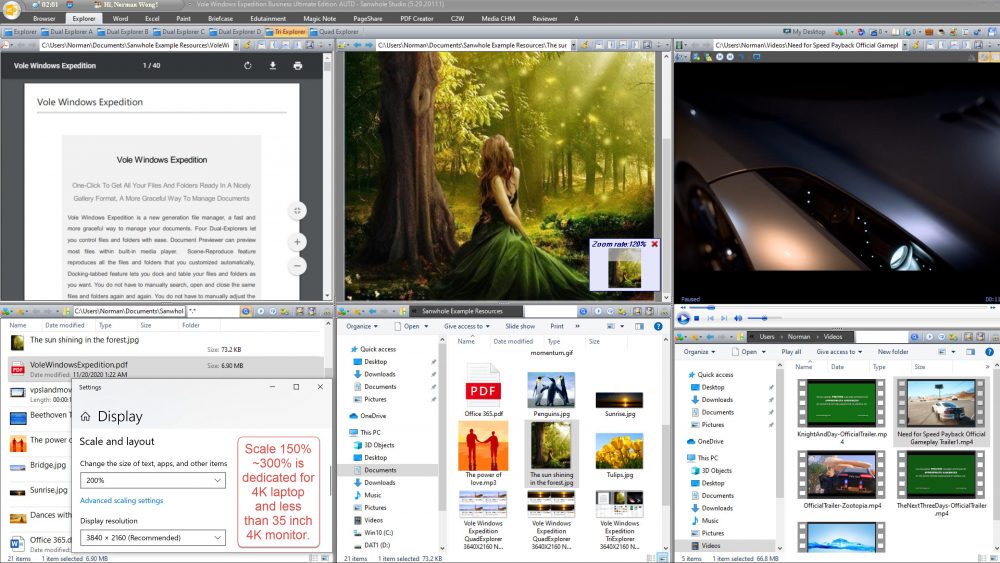
Vole Windows Expedition is a file management utility designed to organize local directories and files into a structured gallery format. The software moves beyond standard navigation by offering specialized layouts, including four Dual-Explorers, one Tri-Explorer, and one Quad-Explorer. These configurations allow users to view and manage multiple file paths simultaneously within a single window.
One of the core features is the Scene-Reproduce function. This tool automatically restores specific sets of files and folders to their previously customized positions, eliminating the need to manually search for and reopen frequently used directories. The interface also utilizes a docking-tabbed system, which allows users to pin and organize various folders into a consolidated workspace. Additionally, a built-in Document Previewer enables the inspection of most file types and media playback directly within the application.
The application is built to accommodate modern hardware, offering full support for 4K, 2K, and 1K HD displays. It includes specific display scaling options ranging from 150% to 300%, which are optimized for 4K laptops and high-resolution monitors smaller than 35 inches. These technical features ensure that the multi-explorer views remain legible and functional on high-DPI screens, facilitating more efficient document management for power users.
Top 5 Reasons To Download Vole Windows Expedition Pro
- Unprecedented Multi-Pane Efficiency: Access Dual, Tri, and Quad-Explorer layouts to manage complex file structures simultaneously without toggling windows.
- Intelligent Scene-Reproduce Technology: Automatically restore your entire workspace, including specific files, folders, and docking positions, with a single click.
- Universal Document Previewer: View almost any file type, including media and documents, directly within the interface using a built-in high-performance player.
- Elegant Gallery-Style Organization: Transform cluttered lists into a graceful, visual gallery format that makes finding and managing assets intuitive and beautiful.
- Native 4K and HD Optimization: Experience crystal-clear visuals with advanced display scaling designed specifically for high-resolution monitors and modern laptops.
Introduction: Why Your Current File Manager Is Holding You Back
If you are like most power users, you spend a significant portion of your workday fighting with your operating system's default file explorer. We have all been there: burying ourselves under a dozen open windows, frantically Alt-Tabbing to find that one specific folder, and manually resizing windows so we can drag and drop files between them. It is a workflow that feels stuck in the nineties. While our hardware has evolved to include massive 4K monitors and lightning-fast processors, the way we interact with our data has remained stubbornly stagnant. This is exactly why Vole Windows Expedition is the breath of fresh air that every professional needs. It is not just a utility; it is a total reimagining of the file management experience.
As a tech reviewer, I see hundreds of "productivity" apps every year, but few actually tackle the core friction of the desktop experience. This software does exactly that. By focusing on a "graceful" approach to document management, it removes the cognitive load of searching and organizing. It treats your files not just as names on a list, but as parts of a larger visual ecosystem. If you are tired of the clutter and the constant clicking, this giveaway is the ultimate solution to reclaim your time and your sanity. Let us dive deep into the five primary reasons why you need to download this software right now.
1. Unprecedented Multi-Pane Efficiency
The standard Windows Explorer allows you to look at one thing at a time. If you want to move files from Folder A to Folder B, you either need two windows open or you need to use the "back and forth" method which is prone to errors. Vole Windows Expedition shatters this limitation by introducing the concept of the Multi-Explorer. Whether you need a Dual-Explorer for simple transfers, a Tri-Explorer for cross-referencing, or the powerhouse Quad-Explorer for massive project management, this app has you covered.
Imagine having four distinct, fully functional file explorers visible on a single screen at the same time. This is a game-changer for digital creators, developers, and administrative professionals. You can have your source images in one pane, your project folder in another, your documentation in the third, and your backup drive in the fourth. The fluidity this provides cannot be overstated. You are no longer "managing files"; you are conducting an orchestra of data. The docking-tabbed feature further enhances this by allowing you to dock and tab your folders exactly where you want them, ensuring that your most important directories are always a glance away.
In a world where multitasking is the norm, having a file manager that supports that lifestyle is essential. The Tri and Quad layouts are particularly impressive when paired with a wide-screen monitor. It eliminates the "window-shuffling" dance that eats up seconds—which turn into minutes, which turn into hours over the course of a week. By downloading this giveaway, you are essentially upgrading your brain’s ability to process information by putting everything you need in a single, organized view.
2. Intelligent Scene-Reproduce Technology
This is, without a doubt, the "killer feature" of Vole Windows Expedition. How many times have you started your workday by opening the same four folders, two spreadsheets, and three reference PDFs? It is a tedious ritual that kills momentum. The Scene-Reproduce feature is designed to eliminate this "startup tax" entirely. It allows you to save a customized "scene" that includes every file and folder you currently have open, along with their exact positions on the screen.
The software’s philosophy is simple: "Have a cup of coffee and let Vole Windows Expedition do the work for you." When you return to your computer or start a new session, one click reproduces your entire workspace. It doesn't just open the folders; it restores the layout, the docking positions, and the specific files you were working on. This level of automation is something we usually only see in high-end Integrated Development Environments (IDEs), but now it is available for your entire file system.
For project-based work, this is invaluable. You can create different scenes for different tasks. Have a "Tax Season" scene, a "Website Design" scene, and a "Family Photo Archiving" scene. Switching between complex tasks becomes instantaneous. No more searching, no more manual adjustments, and no more "where was I?" moments. This feature alone justifies the download, as it transforms the software from a simple file manager into a personal productivity assistant that remembers how you like to work.
3. Universal Document Previewer
Opening files just to see what is inside them is one of the biggest time-wasters in computing. We wait for Word to splash-screen, we wait for heavy PDF readers to initialize, and we wait for media players to load. Vole Windows Expedition solves this by integrating a high-performance, built-in Document Previewer. This isn't just a simple thumbnail generator; it is a robust system that can preview the majority of your files within the app itself.
The built-in media player allows you to check videos and audio files without ever leaving the explorer interface. Documents, images, and various data formats are rendered instantly. This "graceful" way of managing documents means you can flip through a folder of hundreds of files and see the contents of each in real-time. It turns the process of finding the right document into a visual breeze rather than a guessing game based on file names like "Final_v2_REVISED.docx".
The previewer is designed to be lightweight and fast. It bypasses the need to launch external applications for a simple "peek," which keeps your system resources free and your workflow uninterrupted. When you combine this with the multi-pane explorers, you get a command center where you can view multiple files across different folders simultaneously. It is the kind of efficiency that makes you wonder how you ever lived without it.
4. Elegant Gallery-Style Organization
Computers are visual tools, yet we often relegate our file management to boring text lists. Vole Windows Expedition understands that the human brain processes images much faster than text. The Gallery Format feature allows you to get all your files and folders ready in a nicely organized visual layout. This is not just about aesthetics; it is about cognitive efficiency. By presenting your files as a gallery, the software allows you to identify what you need based on visual cues.
This "more graceful way to manage documents" is particularly effective for those who deal with visual media, such as photographers, designers, or even just parents organizing years of family memories. However, even for standard office documents, the gallery view provides a cleaner, more modern look that reduces the feeling of "digital clutter." It makes the interface feel less like a filing cabinet and more like a curated collection.
The docking-tabbed feature complements the gallery view by letting you pin these galleries in a way that makes sense for your specific workflow. You can create a "visual dashboard" of your most important projects. Instead of squinting at tiny icons or reading long file paths, you see a beautiful, organized display of your work. It elevates the entire experience of using a PC from a chore to a pleasure.
5. Native 4K and HD Optimization
We are living in the era of high-density displays. If you have a 4K laptop or a high-end monitor, you know the frustration of software that doesn't scale properly. Buttons become too small to click, text becomes blurry, and the interface looks like it was designed in 2005. Vole Windows Expedition is built specifically for the modern era, offering full support for 4K, 2K, and 1K HD displays.
The software includes dedicated display scaling settings, which is a lifesaver for 4K laptop users. With scaling options ranging from 150% to 300%, you can ensure that the interface is perfectly sized for your specific screen and eyesight requirements. This is particularly important when using the Tri-Explorer and Quad-Explorer modes. On a high-resolution monitor, these multi-pane views truly shine, giving you a massive amount of "screen real estate" to work with without sacrificing clarity or usability.
Using a software that natively understands high DPI (Dots Per Inch) means less eye strain and a more professional look. It makes the "gallery" format look stunning and ensures that every preview is sharp and accurate. If you have invested in a high-quality monitor, you owe it to yourself to use software that actually takes advantage of those pixels. Vole Windows Expedition is that software.
Conclusion: The Pro-Grade Tool You Didn't Know You Needed
In conclusion, Vole Windows Expedition is not just another "file explorer clone." It is a comprehensive productivity suite designed for those who demand more from their hardware. By combining the power of quad-pane management, the intelligence of scene reproduction, and the beauty of gallery-style organization, it addresses every major pain point of modern file management. It respects your time by automating the mundane tasks of opening and positioning windows, and it respects your eyes by providing a beautiful, 4K-ready interface.
As a reviewer, I am always looking for that "X-factor" that makes a piece of software worth the disk space. For Vole Windows Expedition, that factor is flow. Everything about this app is designed to keep you in the zone. You aren't hunting for files; you are using them. You aren't setting up your workspace; it is waiting for you. This is a rare opportunity to get a professional-grade tool that can genuinely save you thirty minutes to an hour of frustration every single day. Do not miss out on this giveaway. Download it, set up your first "scene," and experience what it feels like to finally have total control over your digital world. Your coffee is waiting, and so is a more graceful way to work.
Final Verdict: If you have a high-resolution screen and more than ten folders on your computer, this is a mandatory download. It is the upgrade to the Windows experience that we have all been waiting for.

Reviews for Vole Windows Expedition Pro
Click Here to Read Reviews for Vole Windows Expedition Pro >> Click Here to Submit Reviews for Vole Windows Expedition Pro >>