What Does Movienizer Do?
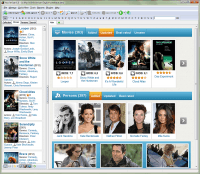
Movienizer is a comprehensive media management tool designed to organize both physical and digital film collections. The software functions as a localized movie encyclopedia, enabling users to catalog titles stored on hard drives or physical shelves. It tracks technical metadata, including audio tracks and subtitle availability, while automatically retrieving synopses and cover art.
The application automates data collection by pulling information from online databases. Users can access details regarding movie budgets, awards, and ratings from sources like IMDb. For cast and crew research, Movienizer stores actor biographies, birth dates, and complete filmographies, allowing for quick cross-referencing between different productions. Additionally, the software can extract movie stills directly from video files or DVDs to provide a visual overview of each entry.
For home theater enthusiasts, Movienizer supports the creation of illustrated catalogs for dedicated hardware media players, such as Dune, Popcorn, WDTV, and Google TV. The system also tracks personal viewing history, allowing users to record which films they have watched and assign individual ratings. This localized database remains accessible offline, providing a searchable resource for plot summaries and actor information without the need for a web browser.
Top 5 Reasons To Download Movienizer
- Total Mastery Over Your Media Chaos: Organize both physical disks and digital files in one unified, searchable interface.
- A Personalized Visual Memory Bank: Never forget a plot point or a rating again with automated screenshots and personal review tracking.
- Instant Encyclopedia-Level Knowledge: Transform into a film expert with deep-dive data on actors, awards, budgets, and filmographies.
- Hardware Integration for Home Theaters: Generate professional, illustrated catalogs for external media players like Dune, Popcorn, and Google TV.
- Lightning-Fast Localized Searching: Experience the speed of a local database that puts the entire history of cinema at your fingertips without the lag of a browser.
If you are anything like me, your movie collection is currently a beautiful, chaotic mess. We live in an era where media is scattered across external hard drives, internal SSDs, and dusty shelves filled with Blu-rays and DVDs. You know you own that one cult classic, but is it in the bedroom? Is it on the 4TB drive that isn’t plugged in? Or did you lend it to a friend three years ago? This is the exact digital headache that Movienizer™ was built to cure. As a reviewer who has tested dozens of library management tools, I can tell you that most of them feel like glorified spreadsheets. Movienizer™, however, is a different beast entirely. It’s a tool developed by movie lovers, for movie lovers, and it functions more like a private, high-powered encyclopedia than a simple list.
Today, we are looking at why you absolutely need to jump on this giveaway. This isn't just about "cleaning up" your folders; it’s about reclaiming your passion for cinema and having a professional-grade database to back it up. Let’s dive into the five biggest reasons why Movienizer™ deserves a permanent spot on your desktop.
1. Total Mastery Over Your Media Chaos
The first and most immediate reason to download Movienizer™ is the sheer level of control it grants you. Most of us have transitioned to digital collections, but we still hold onto those special edition physical disks. The problem is that these two worlds rarely talk to each other. You might have a digital copy of a film on your PC and a 4K steelbook on your shelf. Movienizer™ brings these together into one seamless interface. It acts as a bridge between your physical reality and your digital library.
When you add a movie to this software, you aren't just adding a title. You are indexing every technical parameter that matters to a true cinephile. We are talking about audio tracks, subtitle languages, resolutions, and file locations. If you’ve ever sat down to watch a movie only to realize the version you have doesn’t have the director’s commentary or the specific subtitles you need, you know how frustrating that is. With Movienizer™, all that data is visible at a glance. You can see exactly what you have before you even click "play."
Furthermore, the software helps you manage the physical location of your disks. You can assign "shelf" numbers or locations to your physical media. No more digging through binders or boxes. You simply search the program, and it tells you exactly where the disk is. It’s the kind of organizational power that used to be reserved for professional archivists, now made accessible for your home collection.
2. A Personalized Visual Memory Bank
We’ve all been there: you’re scrolling through a list of movies, you see a title, and you think, "Wait, have I seen this?" Or perhaps you remember watching it, but you can’t for the life of you remember if it was actually any good. Movienizer™ solves this by becoming your personal movie diary. Once you add a movie, you can mark it as "watched," add it to a "wishlist," or even note that you currently have it "lent out" to a friend. This last feature alone is a lifesaver for those of us who lose track of our physical disks.
But it goes deeper than just a "watched" checkbox. The software allows you to store your own personal movie rating alongside the ratings from massive online databases like IMDb. This creates a fascinating comparison over time. You can see how your taste aligns (or clashes) with the critics. To help jog your memory, the program includes a sensible film synopsis and a list of actors. But the real "pro" touch? Automated shots.
Movienizer™ can automatically extract screenshots from your movie files or DVDs. Instead of just looking at a poster, you see the actual cinematography. These visual cues are often much more effective at triggering a memory than a text description. You see a specific lighting choice or a costume in a screenshot, and suddenly the whole experience of watching the film comes rushing back. It transforms your library from a list of names into a rich, visual gallery of your cinematic history.
3. Instant Encyclopedia-Level Knowledge
This is where Movienizer™ truly separates itself from the pack. It isn’t just an organizer; it’s an encyclopedia. If you’ve ever found yourself falling down a Wikipedia rabbit hole at 2:00 AM trying to find out what else a character actor has been in, this software is your new best friend. Because it pulls data directly from the internet and stores it locally, you become a "walking encyclopedia" of film trivia.
You can learn everything: the film's budget, the box office gross, the specific movie awards it won, and the entire production crew. But the actor integration is where it gets really impressive. Within the app, you can click on an actor’s name to see their full filmography, their biography, and photos. One of my favorite niche features is that it can even tell you how old the actor was when they filmed that specific movie. It calculates this based on their birthdate and the movie’s release year. This level of detail is incredible for those of us who love the "meta" side of filmmaking.
By having all this information stored locally, you don't have to wait for pages to load or deal with distracting ads on movie trivia sites. You can navigate from a movie to an actor, then to another movie they were in, and then to the director of that movie, all in a matter of clicks. It’s an interconnected web of film history that is customized specifically to the movies you actually own and care about.
4. Hardware Integration for Home Theaters
For the home theater enthusiasts out there, this reason might be the most compelling. Many of us use dedicated hardware media players like Dune, Popcorn Hour, WDTV, or Google TV to get our movies onto the big screen. While these devices are powerful, their built-in interfaces can sometimes be a bit utilitarian or difficult to navigate if you have a massive library. Movienizer™ steps in as a professional catalog creator for these devices.
You can use the software to create beautiful, illustrated catalogs that are compatible with these players. This means when you’re sitting on your couch with your remote, you aren't just looking at a list of file names like "Movie.Title.2023.1080p.mkv." Instead, you’re browsing a rich, graphical interface with covers, descriptions, and fan art. It elevates the entire "movie night" experience, making your home setup feel like a high-end, private cinema.
The ability to export your carefully curated data into a format these players can read is a game-changer. It ensures that the hard work you put into organizing your collection on your PC actually pays off when it’s time to actually watch the movie. It provides a level of polish that usually requires expensive, proprietary server software, but here it’s all handled through one straightforward tool.
5. Lightning-Fast Localized Searching
In our always-connected world, we often forget how slow and cluttered the internet can be. Searching for a movie on a web browser involves dodging ads, cookies, and irrelevant search results. Movienizer™ changes the workflow by performing an internet search once, downloading all the movie descriptions, covers, and trivia, and then saving it to a local film database.
This means your searches are nearly instantaneous. You can filter your entire collection by genre, year, actor, or even "movies I haven't watched yet that star Tom Cruise and are over 2 hours long." Try doing that with a standard folder system or a basic web search—it’s impossible. The local database structure means your library is available even if your internet goes down. If you're on a laptop while traveling, you still have your entire encyclopedia with you.
The efficiency of the "search and download" feature cannot be overstated. In just a few seconds, the program scouts the web, finds the high-resolution cover art, the official synopsis, and the filmography data, and populates your entry. It’s automated enough to be easy for beginners, but deep enough that power users can manually tweak every single field. You get the speed of a local app with the depth of the entire internet. It’s the best of both worlds.
Final Thoughts: Why You Should Act Now
As a tech reviewer, I see a lot of software that claims to "simplify your life," but Movienizer™ actually delivers because it understands the specific needs of a film collector. It’s not just about knowing you have a movie; it’s about celebrating that movie. It’s about having the posters, the actor bios, the awards, and the screenshots all in one place where they can be appreciated.
We spend a lot of money on our movies, our hard drives, and our displays. It only makes sense to have a piece of software that acts as the "brain" for that entire ecosystem. Whether you are a casual viewer who just wants to keep track of what you’ve seen, or a hardcore cinephile who wants to know the budget of every film in your collection, this software scales to your needs.
The "encyclopedia" aspect is what really wins me over. Having the ability to instantly look up an actor's age or see their entire career history without leaving the app makes you feel more connected to the art form. It turns a collection of files into a curated museum of cinema. Movienizer™ is a powerful, elegant, and deeply functional tool that any movie lover would be lucky to have.
Don’t let your movie collection remain a mystery on your hard drive. Download this giveaway, run the scanner, and watch as your disorganized folders transform into a professional, illustrated, and searchable movie catalog. You’ve already got the movies—now it’s time to finally own them with the control and expertise that Movienizer™ provides. It’s a must-have for anyone who takes their home theater seriously. Embrace your inner movie expert and get organized today!


Reviews for Movienizer
Click Here to Read Reviews for Movienizer >> Click Here to Submit Reviews for Movienizer >>