What Does PDFArea PDF Protection Remover Do?
PDF Protection Remover provides a targeted solution for managing encrypted Adobe Acrobat documents by stripping away security layers and usage restrictions. The utility supports a broad spectrum of encryption protocols, ranging from legacy 40-bit RC4 to modern 128-bit and 256-bit AES standards. By processing files through this tool, users can bypass digital locks that typically prevent the copying of text, the printing of pages, or the modification of document content.
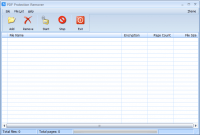
The software operates as a standalone executable, eliminating the dependency on Adobe Acrobat Reader or any third-party print drivers. Its interface is designed for efficiency, allowing for the direct drag-and-drop of files into the workspace. For high-volume environments, the tool includes a batch processing feature that handles multiple PDF documents in a single operation.
Key technical features include:
- Support for RC4 (40-bit and 128-bit) and AES (128-bit and 256-bit) encryption.
- Removal of printing, copying, and editing restrictions.
- Batch processing capabilities for multiple files.
- No requirement for Adobe Acrobat or external print drivers.
Once the decryption process is complete, the resulting files are fully unlocked and can be opened in any compatible PDF software without encountering permission hurdles. This utility offers a factual, straightforward approach to restoring accessibility to secured PDF assets.
Top 5 Reasons To Download PDFArea PDF Protection Remover
If you have ever been frustrated by a PDF file that refuses to let you copy a single sentence, print a hard copy for a meeting, or make a necessary edit, then you already know why a tool like PDF Protection Remover is an absolute essential for your digital toolkit. We have all been there: you receive a document that you have every right to use, but because of a forgotten password or a restrictive setting applied by a previous owner, you are locked out of the very features you need to get your work done. Today, I am looking at a piece of software that promises to end those frustrations once and for all. This is not just another utility; it is a key to your digital freedom. Before we dive into the nitty-gritty details of how it works, let's look at the highlights.
- Full Liberation of Your Documents: Instantly remove restrictions on copying, printing, and editing.
- Support for Military-Grade Encryption: Handles everything from 40-bit RC4 to the ultra-secure 256-bit AES encryption.
- Lightweight, Standalone Performance: You do not need to install or pay for Adobe Acrobat to make this work.
- High-Efficiency Batch Processing: Process hundreds of documents at once instead of wasting time on one-by-one tasks.
- Zero Learning Curve: A simple, intuitive interface that supports drag-and-drop functionality for immediate results.
1. Full Liberation of Your Documents
Let’s be honest: there is nothing more annoying than opening a PDF document and realizing it is essentially a "read-only" brick. You might need to pull a quote for a report, but the copy function is greyed out. You might need to print a contract to sign it, but the print icon is disabled. Or perhaps you need to fill out a form or add a comment, but the editing tools are completely locked away. This is where PDF Protection Remover earns its keep immediately. It is designed to strip away these owner passwords and restrictions with surgical precision.
When we talk about "liberating" a document, we are talking about restoring the utility of the file. In a professional environment, time is money. If you are a student trying to compile research from various whitepapers, being unable to copy text for your bibliography is a massive bottleneck. If you are an administrative professional who needs to merge or edit documents, being blocked by a "permissions" password is a productivity killer. By downloading this giveaway, you are essentially ensuring that you never have to deal with those barriers again. Once the software processes your file, the resulting PDF is completely unrestricted. You can open it in any viewer, use it in any editor, and treat it like any other file you created yourself. It is about taking back control of your workflow.
Furthermore, the software doesn't just "bypass" these issues; it creates a new version of the file that is permanently free of these shackles. This means you can share the decrypted file with colleagues or clients, and they won't need the software to see the changes. It transforms a restricted, difficult document into a standard, collaborative asset. For anyone who deals with a high volume of PDFs from external sources, this feature alone makes the software worth its weight in gold.
2. Support for Military-Grade Encryption Standards
Not all PDF protection is created equal. Some older documents use 40-bit RC4 encryption, which is relatively simple to handle. However, modern security standards have evolved significantly. Today, many sensitive documents are protected by 128-bit or even 256-bit AES (Advanced Encryption Standard) encryption. If you use a subpar, free online tool, you will often find that it fails the moment it hits an AES-protected file. This is where PDF Protection Remover separates the amateurs from the professionals.
This software is built to handle the heavy hitters. With support for 128-bit AES and 256-bit AES, you are getting a tool that is capable of managing the highest levels of security currently used in the PDF format. 256-bit AES is the same level of encryption used by banks and government agencies to protect data. Having a utility that can navigate these complex algorithms and remove the owner-level restrictions is a testament to the robust engineering behind the app. It gives you the peace of mind that no matter how "secure" the restriction on your document is, you have the technology to unlock it.
I want to emphasize how important this is for future-proofing your toolkit. As security standards continue to move toward higher bitrates, older software becomes obsolete. By having a tool that already handles 256-bit AES, you are prepared for the documents of today and the documents of tomorrow. You won't find yourself searching for a new solution six months from now because you encountered a file that was "too secure" for your current software to handle. It is a comprehensive solution for a complex problem.
3. Lightweight, Standalone Performance
One of the biggest headaches in the world of PDF management is the "Adobe Tax." Most people assume that if they want to do anything advanced with a PDF, they need to have Adobe Acrobat Pro installed. As we all know, Adobe's software suite is not only expensive—requiring a monthly subscription—but it is also incredibly "heavy." It takes up significant disk space, uses a lot of system memory, and often installs various background processes that can slow down your computer.
PDF Protection Remover is a standalone utility. This is a massive advantage for users who prefer a lean, mean computing machine. It does NOT require Adobe Acrobat Reader or any other Adobe products to function. It has its own internal engine for parsing and rewriting PDF data. This means you can keep your system clean and avoid the bloat of larger software suites while still getting professional-grade results.
Additionally, the software does not rely on print drivers. Some "workaround" methods for unlocking PDFs involve "printing to PDF" to create a new, unprotected file. However, this often results in a loss of quality, broken links, or messed-up formatting. Because PDF Protection Remover works directly on the file's code rather than using a virtual printer, the integrity of your document remains 100% intact. You get the same fonts, the same layout, and the same image quality, just without the annoying restrictions. It’s a cleaner, faster, and more professional way to work.
4. High-Efficiency Batch Processing
If you have one PDF to unlock, any tool might do. But what if you have fifty? What if you are migrating an entire archive of company documents and realize that they were all saved with "no-print" restrictions five years ago? This is where the batch processing feature of this software becomes your best friend. In the tech world, we always say that you should work smarter, not harder. Manually opening, unlocking, and saving dozens of files is a waste of your valuable time.
With PDF Protection Remover, you can simply select a whole group of files—or even an entire folder—and let the software do the heavy lifting in the background. It processes the queue with impressive speed, churning through documents and outputting unrestricted versions while you go grab a cup of coffee. This feature is particularly useful for IT professionals, legal clerks, or researchers who deal with massive datasets.
The efficiency of the batch engine is designed for reliability. It doesn't crash when it hits a large file, and it maintains a consistent performance level throughout the process. When you consider the amount of time you save by batching these tasks, the value proposition of this giveaway becomes undeniable. It turns a task that could take an entire afternoon into something that takes just a few clicks. If your goal is maximum productivity, you need a tool that respects your time through automation.
5. Zero Learning Curve with Drag-and-Drop
We have all downloaded "professional" software only to be met with a user interface that looks like a flight simulator dashboard. You shouldn't need a PhD in computer science just to remove a printing restriction from a PDF. This is why I am such a fan of the user experience provided by this utility. It is designed with the user in mind, prioritizing simplicity and ease of use over unnecessary bells and whistles.
The drag and drop support is the star of the show here. You don't have to navigate through endless "File > Open" menus. You simply find the files on your desktop or in your file explorer, click them, and drag them directly into the software window. From there, the process is practically automatic. It is an "intuitive" design in the truest sense of the word. Whether you are a "power user" or someone who only uses a computer for basic tasks, you will feel right at home with this interface.
This ease of use is especially important for those high-stress moments when you are in a rush. If you are five minutes away from a presentation and realize your PDF won't print, the last thing you want to do is struggle with a complex software interface. You want something that works now, with no questions asked. PDF Protection Remover provides that "one-click" style of satisfaction. It is a tool that stays out of your way and just does what it’s supposed to do. In the world of tech, sometimes the most impressive feature is that something simply works without any drama.
Conclusion: Why You Should Download This Now
In the digital age, our documents are our currency. Whether they are contracts, research papers, creative projects, or instructional manuals, we need our tools to facilitate our work, not hinder it. PDF Protection Remover is more than just a simple utility; it is a solution to one of the most common "small" problems that can derail a "large" workday. By offering support for the latest encryption standards like 256-bit AES, providing a standalone environment that doesn't require Adobe, and offering the speed of batch processing, this software positions itself as a top-tier choice for any user.
Think about the peace of mind you will have knowing this tool is sitting in your applications folder. The next time you receive a locked document, you won't feel that familiar surge of annoyance. Instead, you will just drag the file into the remover, click a button, and get back to work. It is about removing friction from your digital life.
This giveaway is a fantastic opportunity to grab a professional-grade tool that solves a real-world problem. Whether you need it for the copying and printing freedom, the batch processing power, or simply because you want a lightweight alternative to bloated PDF suites, there is no reason to pass this up. It is quick, it is easy to use, and it handles the most advanced encryption out there. Do yourself a favor and add this to your collection today—you will thank yourself the next time you encounter a "protected" PDF that stands in your way.
Don't wait until you are facing a deadline to realize you need this software. The best time to prepare for a technical hurdle is before you actually hit it. Download PDF Protection Remover and enjoy the freedom of unrestricted, fully accessible PDF documents forever.


Reviews for PDFArea PDF Protection Remover
Click Here to Read Reviews for PDFArea PDF Protection Remover >> Click Here to Submit Reviews for PDFArea PDF Protection Remover >>