What Does Photo Pos Pro PREMIUM Do?
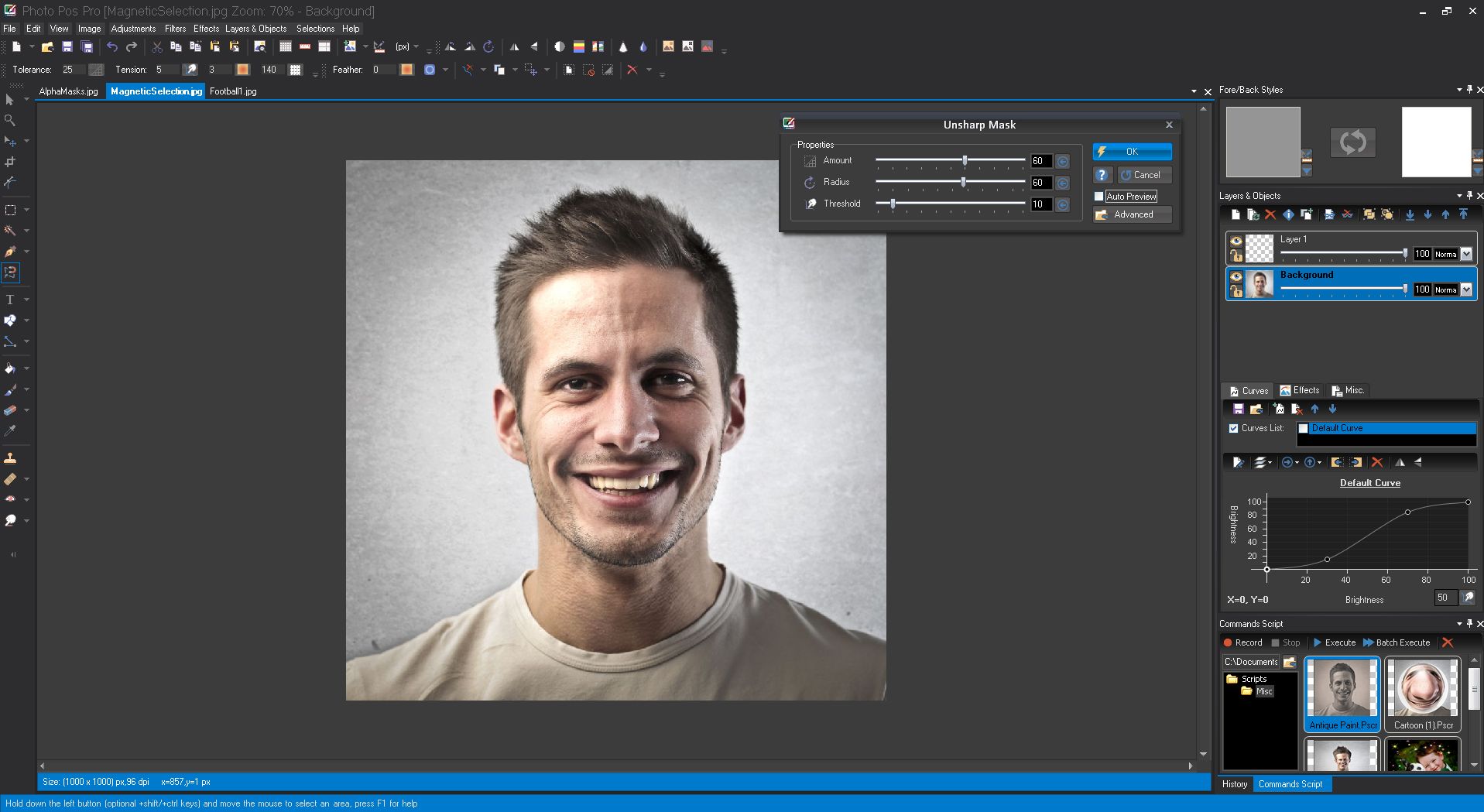
Photo Pos Pro is a comprehensive photo editing and graphic design suite designed to facilitate high-level digital image manipulation. The software provides a workspace for both basic enhancements and complex artistic creations, utilizing a robust engine that supports layers, masks, and vectorial objects. Users can perform technical adjustments using color and blend curves or utilize smart AI selection tools for precise isolation of image elements.
The premium version of the software expands functionality with several professional-grade utilities aimed at both photographers and graphic designers. Key features available in this suite include:
- Advanced Selection and Masking: Precise tools for complex object isolation, including smart AI-driven options and powerful masking parameters.
- Creative Control: Access to dynamic brushes, special effects, and a wide array of built-in and custom filters.
- Vector and Text Tools: Full support for vectorial objects and advanced text manipulation for professional layouts.
- Productivity Features: A command script recorder for task automation and a magic eraser for efficient object removal.
- Premade Templates: Integrated layouts for collages, business cards, and greeting cards to accelerate the design process.
This premium edition also includes grouping options for layers and objects, an ads-free interface, and specific file size saving parameters. These tools allow users to transform digital photos into detailed artworks while maintaining a streamlined workflow for intensive creative projects.
Top 5 Reasons To Download Photo Pos Pro PREMIUM
- Professional Grade Non-Destructive Editing with Layers and Masks: Photo Pos Pro provides a sophisticated layer-based workflow that rivals industry giants, allowing for complex compositions and non-destructive adjustments.
- AI-Powered Smart Tools and Magic Eraser: Leveraging modern artificial intelligence, the software simplifies tedious tasks like background removal and object isolation with precision and speed.
- A Comprehensive Graphic Design Suite: Beyond simple photo retouching, the inclusion of vectorial objects and advanced text tools turns the software into a complete powerhouse for creating marketing materials and digital art.
- Massive Creative Library of Templates and Effects: For those who need results fast, the built-in collection of frames, collages, business cards, and filters offers a massive head start on any project.
- Advanced Automation with Command Scripting: Power users can dramatically increase their productivity by recording scripts to automate repetitive tasks, a feature usually reserved for high-end subscription software.
In the rapidly evolving world of digital photography and content creation, the tools we choose to use can make or break our final output. We have all been there—stuck between using a free mobile app that offers zero control and a high-end professional subscription service that costs a small fortune every month. Finding that perfect middle ground, where professional-grade power meets an intuitive user experience, is the "holy grail" for photographers and designers alike. That is exactly why I am so excited to talk to you about Photo Pos Pro. This is not just another basic photo editor; it is a comprehensive creative ecosystem designed to transform your digital captures into genuine works of art. Whether you are a hobbyist looking to clean up family photos or a budding professional needing to design a brand identity, this giveaway is an absolute game-changer. Let us dive deep into why you need to stop what you are doing and download this software right now.
1. Professional Grade Non-Destructive Editing with Layers and Masks
The hallmark of any professional-grade image editor is how it handles layers. If you have ever used a basic editor, you know the frustration of making a change, only to realize twenty steps later that you want to undo it, but you can’t because the image has been "flattened." Photo Pos Pro solves this problem entirely by offering a robust system of layers, masks, and layer styles. This is the foundation of non-destructive editing, and it is the primary reason why this software stands out in a crowded market.
With layers, you can stack different elements of your project—images, text, and effects—on top of each other. This allows you to edit one specific part of your composition without affecting the rest. But where Photo Pos Pro truly shines is in its masking capabilities. Masking allows you to hide or reveal portions of a layer with surgical precision. Want to swap out a dull, grey sky for a vibrant sunset? By using a layer mask, you can paint away the sky in your original photo and let the sunset layer underneath show through. This level of control is what separates amateur snapshots from professional-level photography.
Furthermore, the layer styles feature allows you to add depth and professional flair to your work. You can easily apply drop shadows, outer glows, bevels, and embossing to any layer. This is particularly useful for text or graphic elements, giving them a three-dimensional look that pops off the screen. The software also supports advanced blend modes and color curves within these layers, giving you total mastery over how different colors and light sources interact across your entire canvas. When you download this premium version, you are essentially getting a professional darkroom and a digital design studio rolled into one.
2. AI-Powered Smart Tools and Magic Eraser
We live in an age where time is our most precious commodity. As a tech reviewer, I am always looking for features that help users work smarter, not harder. Photo Pos Pro delivers on this front with its Smart AI selection tools and the incredible Magic Eraser. Gone are the days of spending hours zoomed in at 400%, meticulously clicking around an object with a lasso tool just to remove a background. The AI integration here does the heavy lifting for you.
The Smart AI selection tools are designed to recognize edges and shapes automatically. Whether you are trying to cut out a person, a complex piece of architecture, or even something as difficult as flowing hair, the AI analyzes the pixels to create a clean, accurate selection in a fraction of the time it would take manually. This feature alone can save a designer hours of tedious work every week. It makes the software accessible to beginners who haven't yet mastered manual selection techniques, while providing a massive speed boost for experienced users.
Then there is the Magic Eraser—a tool that feels almost like science fiction. Have you ever taken the "perfect" photo, only to realize there is a distracting power line, a stray trash can, or an unwanted person in the background? The Magic Eraser allows you to simply brush over the unwanted object, and the software uses intelligent algorithms to fill in the gap with matching textures and colors from the surrounding area. It effectively "heals" the image, making it look as if the distraction was never there. This is the kind of advanced technology that used to be exclusive to expensive, specialized software, but now it is right at your fingertips in this giveaway.
3. A Comprehensive Graphic Design Suite
One of the biggest misconceptions about Photo Pos Pro is that it is "only" for editing photos. While it is an elite photo editor, it is also a formidable graphic design suite. The inclusion of vectorial objects and advanced drawing tools means you can create graphics that are infinitely scalable without losing quality. This is a crucial feature for anyone looking to create logos, icons, or complex illustrations.
Unlike raster graphics (which are made of pixels and become blurry when enlarged), vectorial objects are based on mathematical paths. This means you can design a small icon for a website and then scale it up to the size of a billboard without any pixelation. Photo Pos Pro provides a wide array of vectorial shapes and drawing tools that allow you to manipulate these paths with ease. When you combine this with the powerful text tools, the software becomes a one-stop-shop for branding. You can warp text, place it along a path, and apply those same professional layer styles we discussed earlier to create stunning headers and logos.
The software is also packed with advanced drawing tools and dynamic brushes. These aren't just your standard round brushes; these are brushes that react to your movements, allowing for organic, artistic strokes that mimic real-world media like oils, watercolors, and charcoal. Whether you are using a mouse or a drawing tablet, the responsiveness of these tools is impressive. It allows you to add hand-drawn elements to your photos or start with a blank canvas to create digital paintings from scratch. The versatility here is truly astounding; you are not just getting an editor, you are getting a digital art kit.
4. Massive Creative Library of Templates and Effects
Not every project requires you to start from a blank slate. Sometimes, you have a deadline looming, or you just want to create something fun for social media without spending all day on it. This is where Photo Pos Pro’s pre-made templates and creative library become your best friend. The software comes pre-loaded with an extensive collection of frames, collages, business cards, and greeting cards that are ready to go.
Imagine you need to create a professional-looking business card. Instead of worrying about dimensions and layout, you can simply select a template, swap in your information, add your logo, and you are done. The same goes for photo collages; the software provides beautiful layouts where you can just "drop in" your favorite memories. This focus on "fast and easy" workflow is perfect for small business owners, social media influencers, and casual users who want professional results without the steep learning curve.
But the creativity doesn’t stop at templates. The software is also loaded with built-in and custom filters, as well as a massive array of special effects. We are talking about everything from classic black-and-white and sepia tones to advanced cinematic color grading and artistic distortions. These aren't the cheap filters you find on basic phone apps; these are high-quality, adjustable effects that give you control over every parameter. You can turn a standard landscape shot into an oil painting, add realistic weather effects like rain or snow, or apply light leaks for a vintage film look. The ability to stack these effects and use them in conjunction with masks means your creative possibilities are literally endless.
5. Advanced Automation with Command Scripting
For the final reason, I want to talk to the power users and the productivity enthusiasts. If you find yourself performing the same set of edits over and over again—perhaps resizing images for a website, adding a specific watermark, and adjusting the brightness—you know how soul-crushing repetitive work can be. Photo Pos Pro includes a Command Script Recorder, a high-end feature that allows you to automate your workflow entirely.
With the script recorder, you simply hit "record," perform your series of edits once, and the software saves every single step. You can then "play" that script back on any other image, and the software will replicate those exact actions in seconds. You can even apply these scripts to entire folders of images using batch processing. This is a professional-grade efficiency tool that can turn hours of work into seconds. It ensures consistency across your projects, which is vital if you are working on a series of photos for a gallery or a cohesive brand campaign.
Furthermore, because this is the PREMIUM VERSION we are talking about in this giveaway, you get the added benefit of being ads-free and having unlimited file size saving. Many "free" editors will bombard you with intrusive advertisements or cap the resolution of your saved files, forcing you to pay to get your own work out in high quality. With this version, those barriers are removed. You can work on massive, high-resolution files suitable for large-format printing without any restrictions. When you combine this with the scripting power, you have a tool that respects your time and your creative vision, providing a professional environment that is rare to find in a giveaway.
In conclusion, Photo Pos Pro is a powerhouse of a software that manages to be both deep enough for the pro and accessible enough for the novice. From the technical precision of layers and masks to the futuristic ease of AI-powered selections, it covers all the bases. The ability to jump between photo editing and vector graphic design makes it one of the most versatile tools in any digital creator's arsenal. When you factor in the massive library of templates and the time-saving automation of command scripts, it becomes clear that this isn't just a download—it's an investment in your creative future. Do not miss out on this giveaway; your digital artworks are waiting to be created.

Reviews for Photo Pos Pro PREMIUM
Click Here to Read Reviews for Photo Pos Pro PREMIUM >> Click Here to Submit Reviews for Photo Pos Pro PREMIUM >>