What Does PT Photo Editor Do?
PT Photo Editor is a streamlined image processing application focused on correcting technical flaws and enhancing visual quality. The software provides a suite of tools designed to address standard photographic challenges, such as incorrect exposure levels and unwanted color casts. By utilizing these adjustment modules, users can recalibrate brightness and contrast to recover detail in shadows or highlights that might otherwise be lost in the original capture.
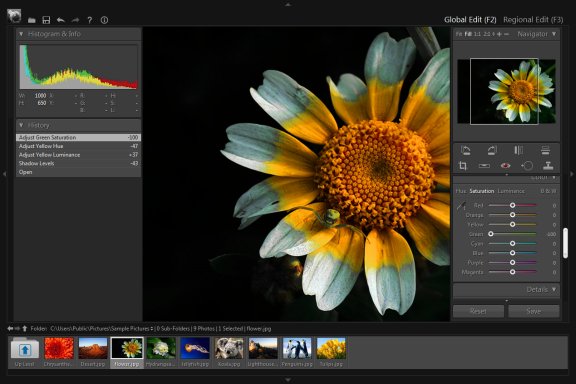
Beyond global adjustments, the application features localized editing capabilities. This regional editing allows for the precise removal of skin blemishes, dust spots, and other imperfections without affecting the entire frame. The toolkit also includes dedicated functions for digital noise reduction and image sharpening to improve clarity in low-light shots or images affected by sensor grain.
For users seeking efficiency, the software offers one-click color optimization and a variety of creative tonal presets. These features aim to transform standard images into more professional-looking compositions. Despite its comprehensive feature set, the application is built to be lightweight, ensuring that it operates effectively on systems with limited hardware resources while maintaining a responsive user interface for high-speed editing tasks.
Top 5 Reasons To Download PT Photo Editor
- Professional-Grade Exposure and Color Correction: Transform dull, flat images into vibrant masterpieces by fixing complex lighting issues with precision.
- Seamless Retouching and Blemish Removal: Achieve studio-quality portraits and clean landscapes by effortlessly removing imperfections and distractions.
- Surgical Precision with Creative Regional Editing: Go beyond basic filters with localized adjustments that allow you to edit specific parts of your photo without affecting the rest.
- High-Octane Performance in a Lightweight Package: Enjoy a lightning-fast workflow that doesn't bog down your system, offering professional power without the "bloatware" feel.
- Instant One-Click Optimization: Perfect for those on the go, the intelligent one-click features provide immediate professional results for exposure and color balance.
In the digital age, we are all photographers. Whether you are capturing a fleeting moment on a family vacation, snapping a professional portrait for a client, or trying to land that perfect landscape shot at golden hour, the reality is that the camera doesn't always see what your eyes see. Sometimes the lighting is harsh, the colors feel "off," or an unwanted blemish ruins an otherwise perfect composition. This is where the magic of post-processing comes into play. However, most users find themselves stuck between two extremes: overly simplistic mobile apps that lack depth, or massive, subscription-based professional suites that take years to master and drain your computer's resources.
Enter PT Photo Editor. This software is a breath of fresh air for anyone who wants professional-level results without the steep learning curve or the heavy system requirements. It is a focused, efficient powerhouse designed specifically to solve the most common photo problems while giving you the creative freedom to turn your snapshots into art. If you have been looking for a reason to upgrade your digital darkroom, this giveaway is your golden ticket. Let’s dive deep into the top five reasons why you need to download PT Photo Editor today.
1. Professional-Grade Exposure and Color Correction
The most common frustration in photography is exposure. How many times have you taken a photo of a beautiful sunset only to find the foreground is pitch black? Or perhaps you took a photo indoors and the entire image has a sickly yellow or blue tint. These are issues of exposure and color cast, and they can ruin the mood of any image. PT Photo Editor excels at solving these fundamental problems with a level of sophistication usually reserved for high-end boutique software.
The exposure tools in this application allow you to rescue detail from the deepest shadows and the brightest highlights. By using advanced algorithms, the software can bring back the texture in a white wedding dress that looked "blown out" or reveal the intricate details of a mountain range hidden in the dark. It isn't just about making an image brighter or darker; it is about balancing the light to create a natural, pleasing look that mimics the dynamic range of the human eye.
Furthermore, the color correction capabilities are top-tier. Color casts—those annoying tints caused by artificial lighting or incorrect white balance—are eliminated with ease. You can quickly neutralize "cold" blue tones from a snowy day or "warm" up a portrait to give the skin a healthy, sun-kissed glow. By mastering these core elements of photography, PT Photo Editor ensures that the foundation of your image is rock solid before you even begin the creative process.
2. Seamless Retouching and Blemish Removal
We’ve all been there: you take a fantastic headshot, but there is a stray hair across the face, a temporary skin blemish, or perhaps a distracting power line cutting through a beautiful architectural photo. In the past, removing these required complex "cloning" tools that often left blurry, noticeable marks. PT Photo Editor changes the game with its intuitive retouching engine.
The blemish removal tool is designed to be both powerful and invisible. It doesn't just "paint over" the problem; it intelligently analyzes the surrounding textures and colors to heal the area seamlessly. This is essential for portrait photographers who want to provide their subjects with a polished, professional look while maintaining the natural texture of the skin. It’s about enhancement, not artificiality.
This power extends to landscape and street photography as well. If there is a piece of trash on the ground or a sensor dust spot in the sky, you can vanish it in seconds. This level of "cleaning" transforms a "good" photo into a "gallery-ready" image. The ability to remove imperfections so quickly saves hours of frustration and allows you to focus on the artistic vision of your work rather than the technical flaws of the environment.
3. Surgical Precision with Creative Regional Editing
One of the biggest differences between a beginner and a pro is the use of "Local" vs. "Global" edits. A global edit affects the whole photo—if you turn up the brightness, the whole photo gets brighter. But what if you only want the sky to be darker and the grass to be more vibrant? That is where Creative Regional Editing comes in, and it is arguably the most powerful feature in PT Photo Editor.
The regional editing tools allow you to apply adjustments to specific areas of your image using masks, gradients, and brushes. For example, you can use a graduated filter to darken a bright sky, adding drama and "punch" to a landscape without making the ground look unnaturally dark. You can use a brush tool to selectively sharpen just the eyes of a portrait subject, making them pop and draw the viewer's attention.
This feature allows for a level of creative storytelling that basic editors simply cannot match. You can lead the viewer’s eye through the frame by subtly brightening the subject and slightly desaturating the background. This "surgical precision" ensures that you have total control over the mood and composition of your final piece. It turns the editor into a digital paintbrush, giving you the freedom to interpret the scene exactly how you imagined it.
4. High-Octane Performance in a Lightweight Package
In the tech world, there is a common trend where software becomes "bloated" over time. Many famous photo editors have become so heavy that they require massive amounts of RAM and the latest processors just to open a single file. For many users, this is a dealbreaker. PT Photo Editor takes a different approach: it is designed to be powerful but lightweight.
Being "lightweight" doesn't mean it lacks features; it means the code is optimized for efficiency. This software opens in a flash and responds instantly to your commands. When you move a slider, you see the result in real-time without the "lag" or "stutter" that plagues other applications. This speed is crucial for maintaining a creative flow. When you have to wait several seconds for a preview to render, you lose your momentum.
This efficiency also makes it the perfect companion for users with older laptops or those who want to edit photos while traveling. You don't need a thousand-dollar workstation to get professional results. PT Photo Editor respects your system's resources, allowing you to run other applications simultaneously without your computer sounding like a jet engine. It’s a lean, mean editing machine that prioritizes the user experience above all else.
5. Instant One-Click Optimization
While we all love to dive deep into manual settings, sometimes we just need a photo to look great right now. Whether you are uploading a batch of photos to social media or sending a quick preview to a friend, speed is often of the essence. PT Photo Editor includes intelligent one-click optimization features that act like a professional editor sitting right next to you.
These one-click tools aren't just simple filters like you find on social media apps. They are smart adjustments based on the specific data in your photo. The software analyzes the histogram and the color distribution to automatically correct exposure and enhance tones. It’s an "easy button" that actually produces high-quality, tasteful results.
Beyond just exposure, the fast sharpening and noise reduction features work wonders on photos taken in low light. If you have a grainy photo from a concert or a dinner party, the noise reduction algorithm can smooth out the digital "chatter" while keeping the edges sharp. It’s this combination of automated intelligence and manual control that makes this software so versatile. It caters to the beginner who wants an instant fix and the professional who wants to tweak every single pixel.
Conclusion: Why You Shouldn't Pass This Up
PT Photo Editor is more than just another utility; it is a comprehensive solution for the modern photographer. By combining high-end tools like regional editing and professional color correction with a lightweight, user-friendly interface, it bridges the gap between complexity and accessibility. It solves the "common" problems—the exposure issues and the blemishes—while providing the "uncommon" tools for true artistic expression.
As a reviewer, I see a lot of software, but it is rare to find a tool that feels this balanced. It doesn't try to be a video editor, a 3D modeler, or a social network. It is a photo editor, through and through, and it performs that job with incredible competence. Whether you are looking to rescue a ruined shot or elevate a great shot into a work of art, this application provides the toolkit you need.
The opportunity to download a tool of this caliber through a giveaway is something you shouldn't ignore. Digital photography is about capturing memories, but photo editing is about perfecting them. Don't let your best memories sit on your hard drive looking dull, dark, or cluttered. Give them the treatment they deserve. Download PT Photo Editor, explore its features, and watch your photography transform before your eyes. This is the upgrade your portfolio has been waiting for.

Reviews for PT Photo Editor
Click Here to Read Reviews for PT Photo Editor >> Click Here to Submit Reviews for PT Photo Editor >>