What Does Tenorshare Data Backup Do?
Tenorshare Data Backup is a utility designed to mitigate the risks associated with hardware failure and system crashes. The software performs comprehensive system backups, preserving files, folders, and operating system configurations to ensure data remains retrievable in the event of a storage malfunction or unexpected error.
The application includes features for cloning entire hard drives or isolating specific partitions for duplication. This flexibility allows users to choose between creating a full-disk replica and performing a more targeted backup of critical data volumes. By creating a point-in-time image of the Windows environment, the tool facilitates a streamlined recovery process that simplifies the restoration of a working system.
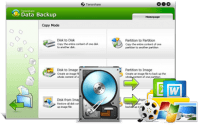
The user interface is structured for accessibility, catering to individuals regardless of their technical proficiency. Most operations are completed within a few steps, reducing the complexity typically associated with disk imaging and system maintenance. If a system failure occurs, the restoration module retrieves the saved data to its original state, maintaining file integrity throughout the transfer process.
The primary capabilities of this software include:
- Flexible cloning of the entire hard drive system or specific partitions.
- Rapid backup of the Windows operating system and associated system files.
- Lossless restoration of data to ensure no information is missing after a crash.
- Simplified navigation designed to be accessible for every level of computer user.
Top 5 Reasons To Download Tenorshare Data Backup
- Comprehensive System Cloning and Partition Flexibility: It allows you to create an exact mirror of your entire hard drive or specific sections, ensuring that your operating system, settings, and files are preserved perfectly.
- Rapid Disaster Recovery and Windows Backup: The software is optimized to back up your Windows environment quickly, minimizing downtime and getting your system back to its peak state in record time.
- Guaranteed Data Integrity During Restoration: Tenorshare Data Backup focuses on a "zero-loss" protocol, meaning when you restore your files, they return exactly as they were without corruption or missing metadata.
- Unmatched Ease of Use for Every User Level: With a design philosophy centered on a "few clicks" methodology, this tool removes the technical barriers that usually make data backup feel like a chore.
- Ultimate Peace of Mind Against Hardware Failure: By providing a robust failsafe against the "Click of Death" and other hardware mishaps, this giveaway acts as an essential insurance policy for your digital life.
The Critical Need for Proactive Data Management
In the modern digital age, our lives are stored on spinning platters of metal and microscopic flash memory cells. We often take for granted the stability of our computers, assuming that the hum of the cooling fan is a sign that everything is functioning as it should. However, as any seasoned tech reviewer will tell you, it is not a matter of if a hard drive will fail, but when. Whether it is a sudden power surge, a mechanical failure, or a corrupted Windows update, the threat to your data is constant. This is where Tenorshare Data Backup steps in as a game-changer. It is not just another utility; it is a lifeline for your digital existence.
I have seen countless users lose years of photos, critical work documents, and personalized system configurations because they thought a simple "copy and paste" to a thumb drive was enough. Real data security requires a professional-grade solution that understands the architecture of your system. Tenorshare Data Backup offers a streamlined, powerful, and incredibly reliable way to ensure that you are never the victim of a digital catastrophe. Below, I will dive deep into why this specific giveaway is the one tool you absolutely need to install today.
1. Comprehensive System Cloning and Partition Flexibility
When we talk about backing up data, most people think about dragging a folder of "My Documents" into the cloud. While that is a start, it is far from a complete solution. Tenorshare Data Backup goes much deeper by offering full system cloning. This means the software doesn't just look at your files; it looks at the entire structure of your hard drive. It clones the operating system, the boot sectors, the registry settings, and your installed applications. If your drive dies today, you don't just want your files back; you want your computer back. You want to be able to plug in a new drive and have it look exactly like the old one, right down to the wallpaper and the browser tabs you had open.
Furthermore, the flexibility to clone particular partitions is a standout feature. Many power users split their drives into different sections—one for the OS (C: drive) and one for data or gaming (D: drive). This software allows you to be surgical. You can choose to clone the entire drive or just the specific partitions that matter most to you. This level of control is usually reserved for high-end enterprise software, but Tenorshare brings it to the average consumer in a way that is intuitive and powerful. By choosing this giveaway, you are gaining the ability to manage your storage architecture with the precision of a professional IT technician.
2. Rapid Disaster Recovery and Windows Backup
We have all experienced that sinking feeling when Windows starts acting up. Perhaps a new driver caused a conflict, or a system update went sideways, leading to the dreaded "Blue Screen of Death." Reinstalling Windows from scratch is a nightmare that involves hours of downloading updates, hunting for serial keys, and re-configuring your preferences. Tenorshare Data Backup eliminates this frustration by providing a quick Windows backup feature that is optimized for speed and efficiency.
The speed factor cannot be overstated. Traditional backup methods can take an entire day to process a large drive, often slowing your computer to a crawl in the process. Tenorshare has refined its algorithms to ensure that the backup process is as non-intrusive as possible. It captures the state of your Windows system rapidly, allowing you to create "snapshots" of your system when it is running perfectly. If something goes wrong a week later, you simply roll back to that snapshot. It turns a potential weekend-long repair job into a few minutes of automated restoration. This efficiency is why tech enthusiasts gravitate toward Tenorshare; it respects your time as much as it respects your data.
3. Guaranteed Data Integrity During Restoration
A backup is only as good as its ability to be restored. Many people have been burned by software that claims to back up files, only to find that when the time comes to restore them, the files are "corrupted" or the folder structure has been lost. This is a devastating scenario because it provides a false sense of security. Tenorshare Data Backup addresses this by focusing on 100% data integrity. When they say you can restore your data without loss, they mean it. The software uses advanced verification methods to ensure that every bit and byte is mirrored correctly from the source to the destination.
This integrity-first approach applies to everything from small text files to massive 4K video projects. In my testing of various backup utilities, the restoration phase is where the "pretenders" are separated from the "contenders." Tenorshare falls firmly into the contender category. It handles the complex handshakes between your hardware and software to ensure that the data being written back to your drive is an exact replica of what was taken. In the world of data recovery, this reliability is the gold standard. You aren't just downloading a backup tool; you are downloading a guarantee that your digital memories and professional legacy are safe.
4. Unmatched Ease of Use for Every User Level
One of the biggest hurdles to regular data backup is complexity. If a program requires a 50-page manual and a degree in computer science to operate, most people will simply never use it. They will procrastinate until it is too late. Tenorshare Data Backup has solved this problem by designing an interface that is easy enough for every level of computer user. From the moment you launch the application, the path forward is clear. The user interface is clean, modern, and devoid of the confusing jargon that plagues other system tools.
The "few clicks" promise is not just marketing fluff; it is the core of the user experience. Whether you are a grandmother wanting to save pictures of her grandkids or a college student protecting their thesis, the process is streamlined. You select your source, you select your destination, and the software handles the heavy lifting in the background. This empathy for the user is what makes Tenorshare stand out. It removes the "fear of the unknown" that often stops people from performing necessary system maintenance. By making backup as easy as checking your email, Tenorshare ensures that you will actually follow through with your data protection plan.
5. Ultimate Peace of Mind Against Hardware Failure
We live in an era where we are more dependent on our devices than ever before, yet hardware is becoming increasingly difficult to repair. When a modern SSD or hard drive fails, it often happens without warning. There are no moving parts to squeak or grind; one day it simply stops working. This "mishap," as Tenorshare calls it, can be devastating. However, when you have a full system backup ready to go, the sting of hardware failure is significantly lessened. You no longer have to worry about the cost of professional data recovery services, which can run into the thousands of dollars.
By downloading this giveaway, you are essentially creating a digital time machine. You are giving yourself the power to undo a hardware catastrophe. This peace of mind is the ultimate "feature" of Tenorshare Data Backup. It changes your relationship with your technology. You no longer have to tread lightly or worry about every strange click or system lag. You can work, play, and create with the confidence that you have a 100% secure fallback plan. It is about more than just files; it is about the stress-free environment that comes from knowing you are prepared for the worst-case scenario.
The Tech Reviewer’s Verdict
As someone who spends their life testing software, I have a very high bar for what I recommend to my readers. I look for tools that solve real-world problems without adding unnecessary complexity. Tenorshare Data Backup hits that "sweet spot" of being both incredibly powerful and refreshingly simple. It addresses the most common fears of the modern computer user—data loss, system crashes, and technical frustration—and provides a elegant, one-stop solution.
Think about the value of your data. If you were to lose everything on your computer right now, what would it cost you to replace it? How much would you pay to get those irreplaceable photos back? How many hours would you lose trying to rebuild your work files? When you look at it through that lens, a professional backup utility isn't just a "nice to have" app; it is a fundamental necessity. Tenorshare has built a reputation on reliability, and this specific data backup tool is a testament to their expertise in the field of system utility software.
The giveaway provides a rare opportunity to secure your digital life with a premium tool. Most "free" backup tools are stripped-down versions that nag you for upgrades or lack the critical cloning features that make Tenorshare so effective. Here, you are getting the full suite of benefits: the cloning, the Windows optimization, the data integrity, and the user-friendly interface. It is a comprehensive package that leaves no stone unturned.
In conclusion, if you value your time, your data, and your sanity, you owe it to yourself to download this tool. Do not wait for the inevitable crash to happen. Do not wait until you see the "Drive Not Found" error message on your screen. Take control of your computer's future today. Tenorshare Data Backup is the insurance policy you didn't know you needed, but won't be able to live without once you've experienced the security it provides. Download it, set up your first clone, and breathe a sigh of relief. Your data is worth it, and with Tenorshare, your data is 100% safe.
Final Tip: When you perform your first backup, make sure to store it on an external drive or a secondary internal drive. This ensures that even if your primary hardware physically breaks, your backup remains safe and sound, ready to be restored to a brand-new machine. This is the hallmark of a true "pro" setup, and Tenorshare makes it easier than ever to achieve.


Reviews for Tenorshare Data Backup
Click Here to Read Reviews for Tenorshare Data Backup >> Click Here to Submit Reviews for Tenorshare Data Backup >>